
Flash Builder 4 and PHP
Data/Services for beginners
November 6th, 2009
 Application that you create in Flex 4 uses PHP and MySQL database. It shows the most simple and the most recent approach for working with data in Flash Builder 4/Flex 4. Basically it’s just a few clicks, which generate the necessary code. We use Flash Builder 4 Beta 2 introduced at MAX 2009.
This tutorial provides a base for working with data in Flex 4 - to understand the deeper options I recommend PHP and Flex tutorial by my fellow evangelist MIHAI CORLAN Flex for PHP developers [en].
Note: This article is English translation of my Czech article published at Zdrojak.root.cz - Jak na to: SpojenĂ Flex 4 a PHP ve Flash Builderu 4 [cz]. It can contain some Czech titles or texts in demos, just disregard and use what fits you the best.
Required software
- HTTP, PHP 5, MySQL 5 server (e.g. for Mac MAMP, for Win WAMP)
- Flash Builder 4 Beta 2
- Flash Player 10 (installed with Flash Builder 4)
- Optional Zend Framework (if you do not have him Flash Builder will install itself 4)
Finished app (source code can be displayed using the View Source context menu in the application)
Source-code
- Flex a PHP (just for check)
- Employee database in SQL (you need this, we will search in it)
Data/Services panel
Flash Builder 4 introduced Data/Services panel, which simplifies working with data services like Web Services, PHP, ColdFusion, Java (Blaze DS, LiveCycle DS) or simple HTTPService.
Data/Services panel significantly speeds up the overall development of RIA applications. Manages connections with data and separates the code to work with services from your code. This approach allows you to create a RIA as E-shop a few days and with the administration.
Along with Data/Services there is a new Network Monitor panel for debugging and monitoring request/response data transfer between client and server.
Step 1 - Create a project in Flash Builder 4
File -> New -> Flex Project
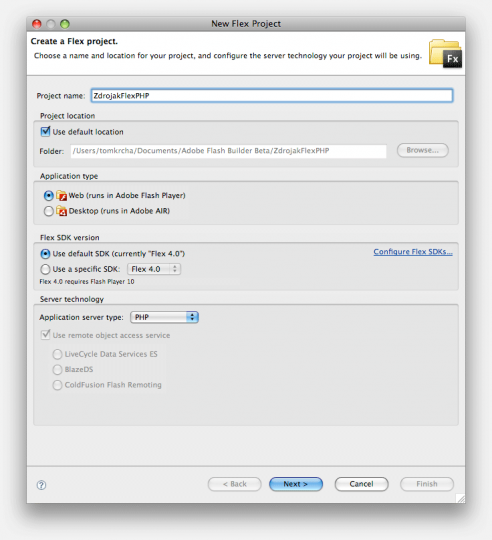
Enter the name of the project “ZdrojakFlexPHP, select Application server type “PHP” and click Next.
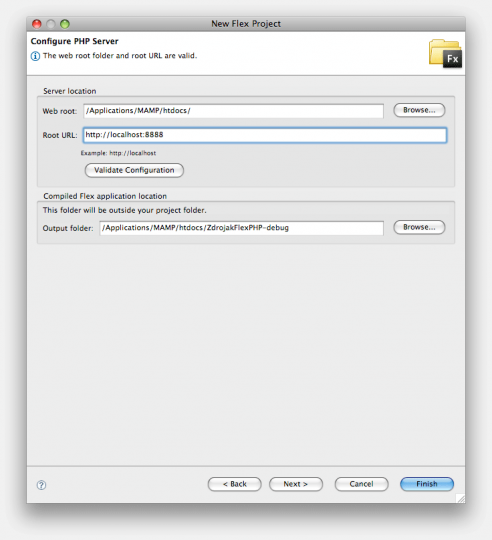
Make sure the HTTP server is running, set the Web root which is the root folder for the Web server. Also, set the Root URL - the address targeting Web root - and click Validate Configuration.
Leave the default settings in Compiled Flex application location and click Finish.
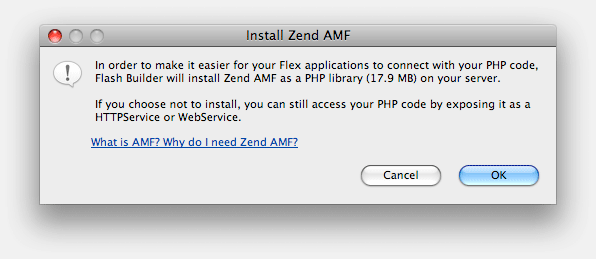
If you haven’t Zend_AMF installed on your server, Flash Builder 4 will offer you to install it. Click OK.
Following code is generated. Declarations block contains services.
<?xml version="1.0" encoding="utf-8"?>
<s:Application xmlns:fx="http://ns.adobe.com/mxml/2009"
			   xmlns:s="library://ns.adobe.com/flex/spark"
			   xmlns:mx="library://ns.adobe.com/flex/halo" minWidth="1024" minHeight="768">
	<fx:Declarations>
		<!-- Place non-visual elements (e.g., services, value objects) here -->
	</fx:Declarations>
</s:Application>
Step 2 - Add data service
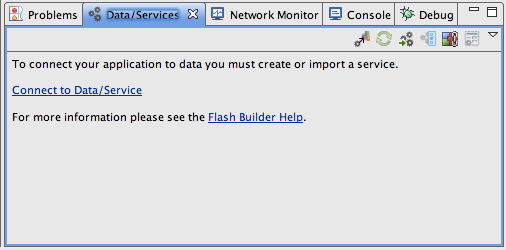
V panelu Data/Services klikneme na Connect to Data/Service.
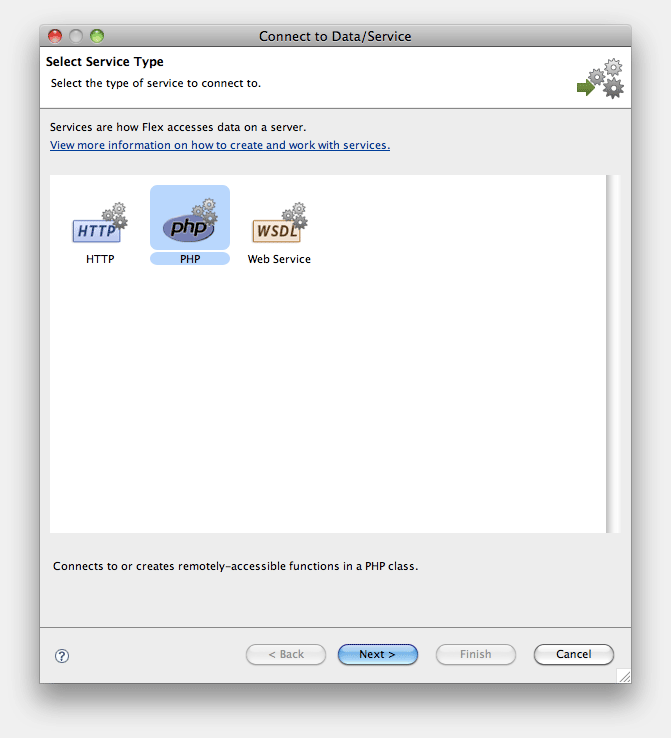
Choose PHP a click Next.
Click Generate sample PHP class.
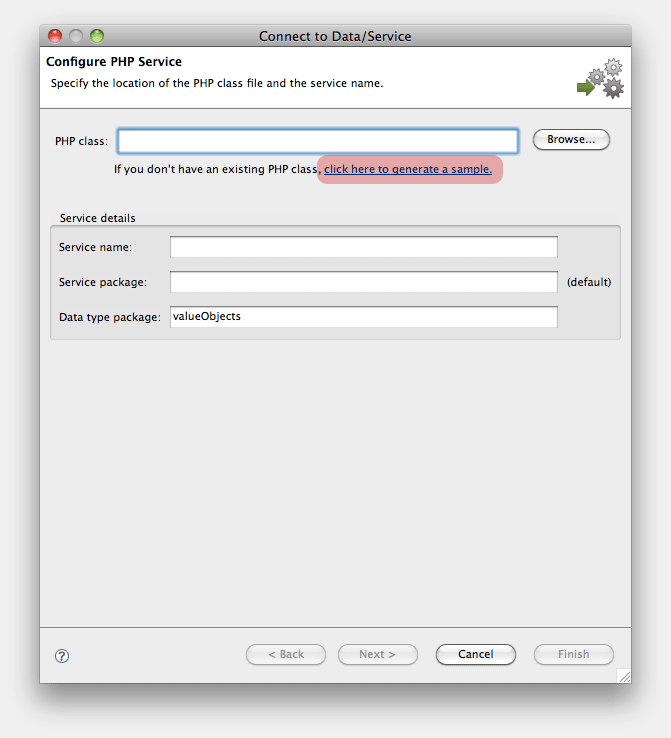
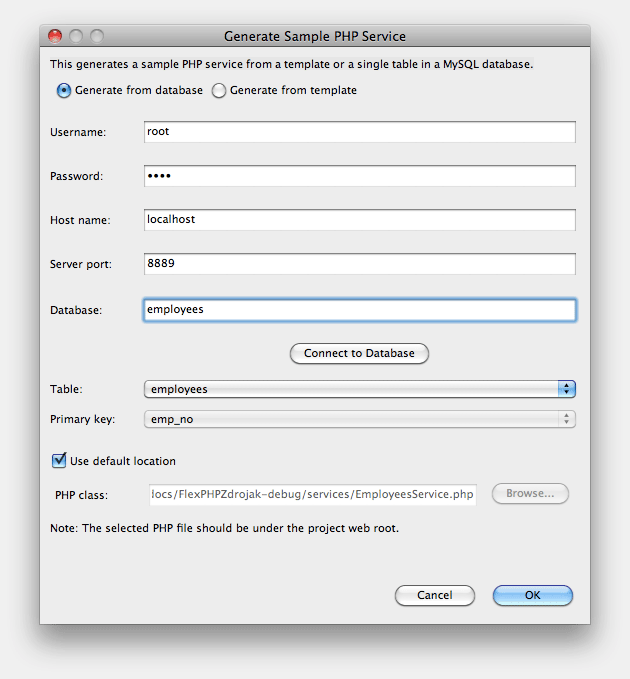
Flash Builder 4 can generate PHP backend classes without writing a single line of code. Simply connect to the database and select the target table. It automatically generates class with all the basic functions according to the CRUD methodology (Create Read Update Delete). This step greatly simplifies the overall connection.
Fill in your access data. Click Connect to Database - available tables load up. Select table employees. Primary key emp_no should be chosen automatically. Click OK.
Security Information warns you with steps you should follow, when releasing production version. Click OK.
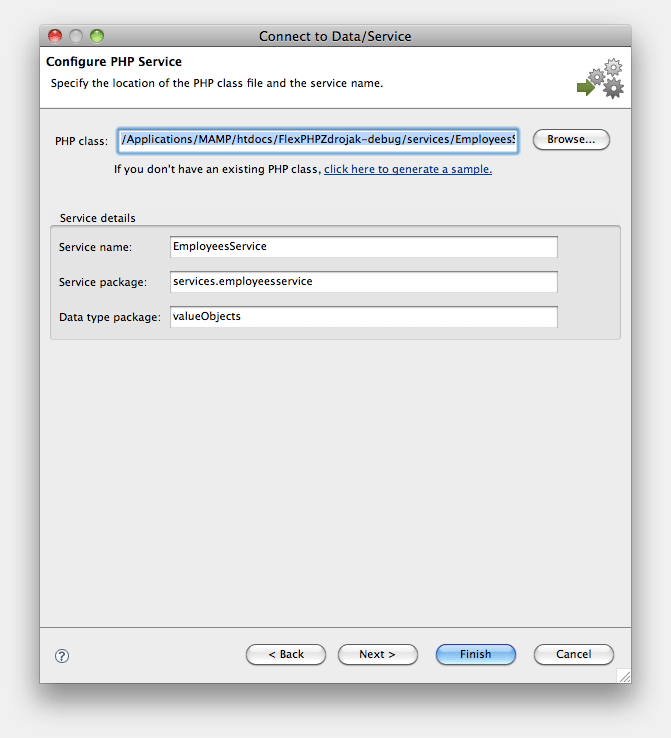
Click Next. The following screen displays a list of available services, including functions and return types. Click Finish.
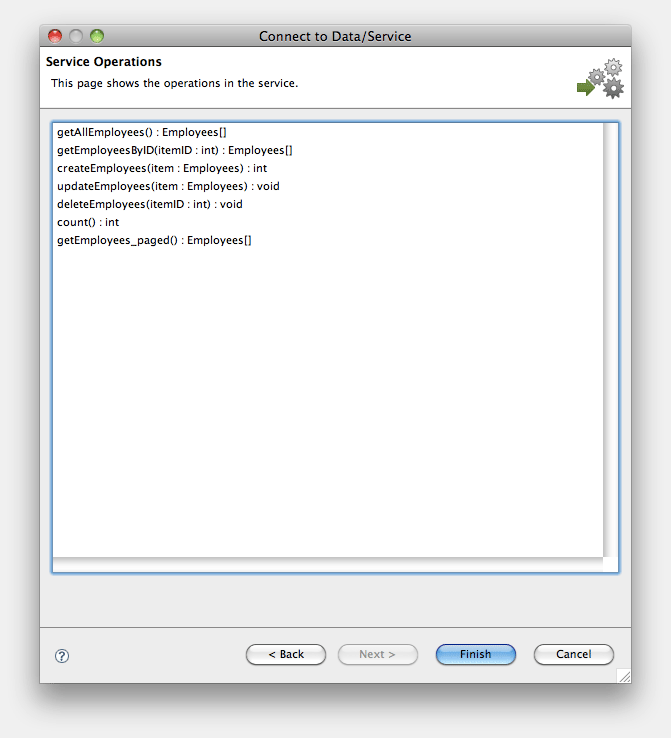
EmployeesService has been added to Data/Services panel. Together with this you can find EmployeesService.php on the server (in services folder) containing the following features:
- __construct - establish connection
- getAllIEmployees - returns all employees
- getEmployeesByID - returns an employee
- createEmployees - creates an employee
- updateEmployees - updates an employee
- deleteEmployees - deletes an employee
- count - returns count of all employees
- getEmployees_paged - returns employees with paging support - check ListPaged component
The code is set and ready to use. Just make few adjustments to getAllEmployees function (in EmployeesService.php) to enable database search (parameter $q).
public function getAllEmployees($q) {

    $sql = "SELECT * FROM $this->tablename WHERE first_name LIKE '%$q%' OR last_name LIKE '%$q%' OR email_address LIKE '%$q%'";

    $stmt = mysqli_prepare($this->connection,$sql);

    $this->throwExceptionOnError();

    mysqli_stmt_execute($stmt);
    $this->throwExceptionOnError();

    $rows = array();

    mysqli_stmt_bind_result($stmt, $row->emp_no, $row->birth_date, $row->first_name, $row->last_name, $row->gender, $row->hire_date, $row->phone_no, $row->email_address, $row->job_title);

    while (mysqli_stmt_fetch($stmt)) {
      $rows[] = $row;
      $row = new stdClass();
      mysqli_stmt_bind_result($stmt, $row->emp_no, $row->birth_date, $row->first_name, $row->last_name, $row->gender, $row->hire_date, $row->phone_no, $row->email_address, $row->job_title);
    }

    mysqli_stmt_free_result($stmt);
    mysqli_close($this->connection);

    return $rows;
}
PHP is ready now.
Let’s move to Flash Builder and refresh the service using Refresh button. The changes will apply. Function getAllEmployees should now accept search string parameter q:Object.
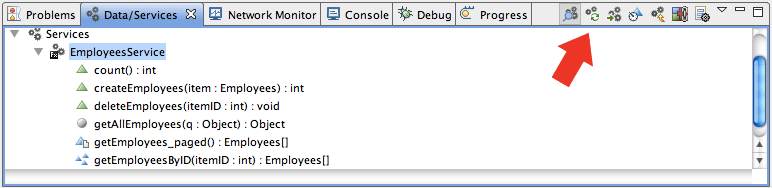
After restoring we have to set the correct return type. We
After refreshing we have to set the correct return type. Invoke the context menu on getAllEmployees, select Configure Return Type -> Use an existing data type from the drop-down box select the field staff - Employees[].
Step 3 - Create Flex UI for search
Lay out components List, TextInput and Button as on following figure and assign them the following ids: listSearch, txtSearch, btnSearch
Drag getAlllEmployees from Data/Services panel and drop it on Button (btnSearch) - directly in Design view. This action generates an event handler with a service call. Instead of q pass txtSearch.text.
protected function btnSearch_clickHandler(event:MouseEvent):void
{
    getAllEmployeesResult.token = employeesService.getAllEmployees(txtSearch.text);
}
We have to bind search result to the list listSearch using dataProvider. Braces represent binding - if [Bindable] variable changes, the changes are automatically reflected. At the same time set the labelField to last_name. You can play with better label representation by adjusting labelFunction and itemRenderer - recommended to explore. Also note that we are working with lastResult - or the last result of the call.
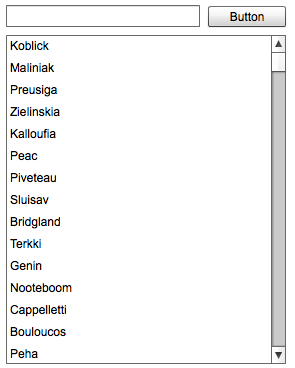
<s:List x="10" y="40" width="280" height="329" id="listSearch" dataProvider="{getAllEmployeesResult.lastResult}" labelField="last_name"></s:List>Test the app, if it does, what it is supposed to. It should look like this:
Step 4 - items edit
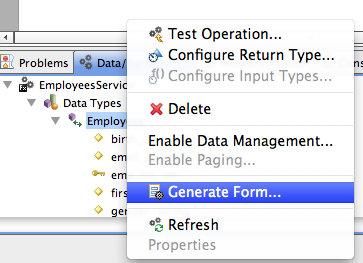
Move to Data/Services panel, invoke context menu on type Employee and choose Generate Form…
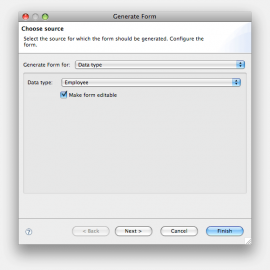
Leave Make form editable checked and go Next.
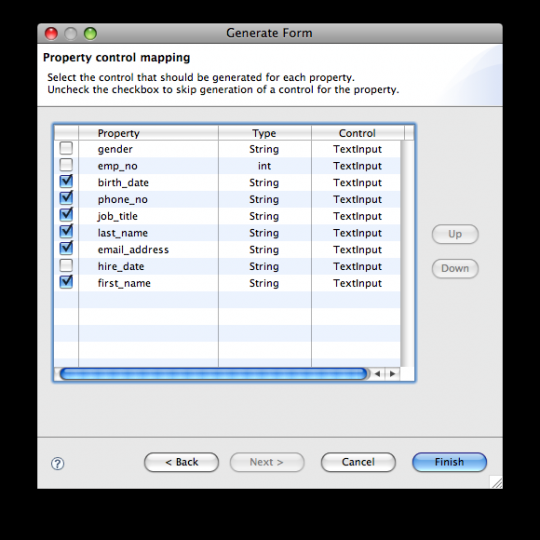
Choose items, you want to keep visible/editable and click Finish.
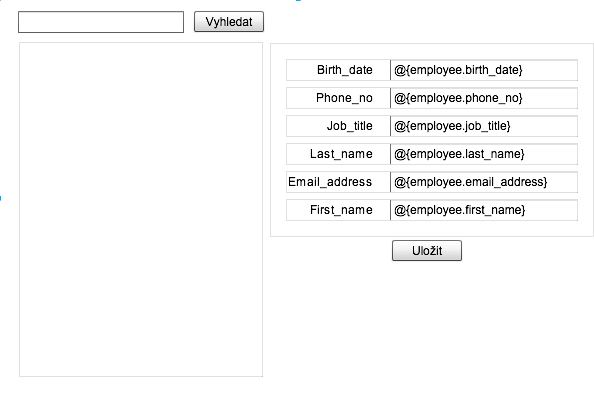
The form is generated, take it and move it right. Add Save button (btnSave) and retitle the first button to Search
Similar way we add handler On change to the List (listSearch)
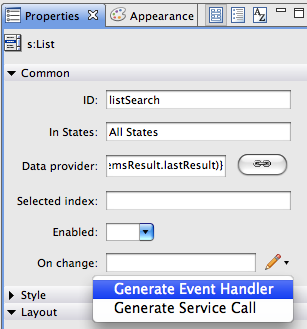
employee variable is set choosing an item from the list. Final code:
protected function listSearch_selectionChangedHandler(event:IndexChangedEvent):void
{
    employees = listSearch.selectedItem;
}
Step 5 - Save update
Drag-and-drop updateEmployee from Data/Services to btnSave. Change item to employee and thanks to two-way binding we have fully-editable of the item. Handler should look like this:
protected function btnSave_clickHandler(event:MouseEvent):void
{
    updateEmployeesResult.token = employeesService.updateEmployees(employees);
}
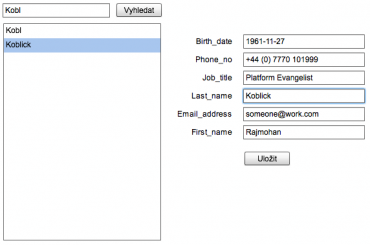
Final app preview:
Facebook comments:
106 Comments »
RSS feed for comments on this post. / TrackBack URL
Nice tutorial, should be very helpful for beginners.
-
LN
Comment by Lukas Nemecek — November 7, 2009 @ 6:19 pm
Any way to use it with standard AIR (FLASH BASED) project? i’m get enought to see all this cool feature implemented only for flex side of developers, out there there are still As3 developer that don’t use flex framework..
Comment by Snick — November 8, 2009 @ 7:36 pm
It is a really nice tutorial. Too bad, for me, the configure php service dialog’s sample generation fails after I select the table name…it finds the table but crashes before the pk can be displayed.
Comment by flipper — November 9, 2009 @ 2:55 am
Flash Builder will allow you to create AS3 only projects, however the Data Services will only work on Flex projects.
However with some sneaky modifications you can include the right libraries into a AS3 project to wrap the core web services (com.adobe.fiber).
Try not to think of flash as different then flex .. You can still do everything you can in flash, in flex. Flex is simply an additional set of libraries.
But check out the LiveCycle packages (com.adobe.fiber)
go to: http://livedocs.adobe.com/flex/gumbo/langref/ and in the top left, under filters select LiveCycle 3, then hit “show table of contents” on the top right. This will expose all of the com.adobe.fiber packages, which are currently the packages used when using the automatic code generation in flex builder.
Comment by Method — November 9, 2009 @ 7:52 am
We will figure it out. Let’s follow on here http://forums.adobe.com/thread/519648?tstart=0
Comment by tom — November 10, 2009 @ 10:54 am
Snick - it uses Flex classes for connecting to database. Flex is also set of RPC classes, thus it can’t be used outside of Flex.
Comment by tom — November 10, 2009 @ 10:55 am
Will this work on a shared server? I wonder if Zend Framework can be installed in shared web space.
Comment by Phil — November 10, 2009 @ 4:21 pm
Sure - just copy paste it … it’s just bunch of files.
Comment by tom — November 10, 2009 @ 5:28 pm
As noted on the adobe forums discussion, the issue I ran into must have come from using a version of php that was too stale.
This is a great tutorial. Thank you for posting it!
I also wonder about the zend amf component on a shared hosted server. Are we sure that because zend amf comes with flash builder 4, that it’s ok to deploy? Hope so.
Comment by flipper — November 11, 2009 @ 2:57 am
You can always download Zend framework from http://framework.zend.com/ and use it. You don’t have to use Zend, which is installed by Flash Builder.
Comment by tom — November 12, 2009 @ 10:43 am
I didn’t realize that the zend framework was under an MIT license.
Is there any reason that the techniques shown in the tutorial, and the flash builder data services, would be considered inadequate for production use? What I mean is, sometimes code generated by wizards is quick but not really robust. I remember when Ted Patrick made a blog post about the flex 3 crud wizard, some people commented that it was good for showing off flex 3 a bit but not worthy of consideration for a production app. (http://www.onflex.org/ted/2007/09/flex-3beta-2-crud-wizard-for-aspnet-php.php)
The features shown in this tutorial look pretty worthy to my eye but I’m very new to flex. I hope this stuff is robust enough for use in at least some production situations?
Comment by flipper — November 17, 2009 @ 4:34 am
The good thing is that Flex code is in this case [Managed] by Flash Builder 4. So you will never be touching it, which isolates it from bugs caused by developer.
There is nothing better than go ahead and try it.
Comment by tom — November 17, 2009 @ 3:07 pm
Do happen to know if the Data Services tab in the flash builder IDE works with other data services? What if one is using weborb or BlazeDS?
Comment by flipper — November 17, 2009 @ 6:44 pm
Hi,
This is very good example for those who are beginner in action script.
This example help me a lot to connect php server.
Comment by prashant kumar — December 17, 2009 @ 9:17 am
when i’am in step “generate sample PHP service” (conect flahsh b. on mysql)
.. i cliked in a button “connect to Database” , and this ‘fatal error’ is ‘show’ :
Fatal error: Maximum execution time of 60 seconds exceeded in C:\xampp\php\PEAR\Zend\Db\Adapter\Pdo\Abstract.php on line 0
this happened wiht somemore else?
what’s can be wrong???
Comment by rafa — December 22, 2009 @ 8:10 pm
this happened to me too….. i dont know wht s wrong…. i’m using XAMPP ….
Comment by jullius — December 23, 2009 @ 2:46 am
hi
i am very new to flex so i followed this tut. i get this error in a dialog:
Channel disconnected
Channel disconnected before an acknowledgement was received
what am i doing wrong?
Comment by ron — December 24, 2009 @ 2:44 pm
I went back to this example app which I built and had running in Nov and I too now get that error:
Channel disconnected
Channel disconnected before an acknowledgement was
Comment by flipper — January 2, 2010 @ 9:22 pm
Hi,
Thanks for the tutorial but i have a few question.
I am now developing online game and searching a way to save data to mysql from the game.
Can i use flex for this purpose? Or i need to save it from as3 file etc?
Thanks,
Ramzan
Comment by Ramzan — January 4, 2010 @ 10:38 am
@Ramzan: Sure you can use Flex.
Comment by tom — January 12, 2010 @ 12:21 am
Guys, there has been some problems with XAMPP read more here: http://forums.adobe.com/thread/519648?tstart=0
Comment by tom — January 12, 2010 @ 12:21 am
Thanks for posting this up does make this seems really cool to play with.
I do have an issue and maybe somewhere knows how to get around it.
By staying inside the Flash Builder and using the fancy generate / drag and drop I run into the following issue:
My development environment is not on the root URL of the web server. Each Developer in my company has their own area and we work with svn so on the development server everyone has a URL like this to work with:
http://internalserver/~username/projects/projectNam/trunk
Almost everything seems like I could get it to work IF I could just get flash builder to be not so dependent on having server root url and paths.
I tell Flash Builder the root of the project and url but in the end its so stubborn and tries to include things from the / and not /~user/projects/….
Can Flash Builder work like this outside of server roots and paths? I would hate to have to create a separate domain name for each project just for dev work?
Comment by Rob — January 13, 2010 @ 11:49 am
Tom I’m one of the people there reporting that an update of xampp worked for me. But as noted above, after a couple weeks of not touching flex 4 or php or mysql the sample project that I built with your tutorial fails with the channel disconnect error.
Comment by flipper — January 16, 2010 @ 7:15 am
I get this error while connecting in
Generate Sample PHP Service -> Generate from database
Unable to connect to database using specified connection information.
java.io.IOException: Server returned HTTP response code: 500 for URL: http://localhost/php5/tempgateway.php
Comment by Robin Thomas — January 16, 2010 @ 11:55 am
I set up a new virtual server to see if I could get this to work again.
A new error - after the data service has been created, or configured, the returned data type is not Employees[] as the screenshot shows. Every place that the screenshot shows Employees[] I have Object. I don’t know how to adjust that or why this time it didn’t automatically show up as expected.
This makes the rest of the tutorial impossible to follow. Hope someone will provide input.
Comment by flipper — January 18, 2010 @ 3:27 am
I see - can you send me exact setup you have on your machine? Which server, PHP version, DB version, FB4 version…
Comment by tom — January 18, 2010 @ 8:11 pm
Sure it’s windows 7 pro; xampp 1.7.2; php 5.3.0; apache 2.2.12; mysql 5.1.37. FB is 4 beta 2. I let FB install zend and didn’t update that.
Comment by flipper — January 22, 2010 @ 10:39 am
if you get the error with localhost/tempgateway.php java.io.FileNoteFoundException then you have configured the wrong path to the server.
in my case it looked like this:
Web root:
C:/xampp/htdocs/snow
Root URL:
http://localhost/snow/
type in your settings and it will work!
thanks,
ben
Comment by ben — February 25, 2010 @ 7:59 pm
How we can change charset in the sql query ?
for example I want to display latin5_turkish_ci in datagrid but some character not display .
Thanks.
Comment by Ahmed — March 27, 2010 @ 9:01 pm
Thanks for article
Here is video tutorial: How to use Flash Builder 4 for developing RIA apps (Slovak version): http://www.flexgarden.net/2010/04/05/video-tutorial-flash-builder-4-tvorba-air-aplikacie/
Comment by Georgik — April 5, 2010 @ 11:02 pm
Great job, Georgik!
Comment by tom — April 15, 2010 @ 1:27 pm
hi
i am very new to flex so i followed this tut. i get this error in a dialog:
Channel disconnected
Channel disconnected before an acknowledgement was received
what am i doing wrong?
Comment by Germán — April 21, 2010 @ 4:53 pm
Hi Germán,
This means you have an error in your PHP code. Did you make any changes?
Cheers,
Roelof
Comment by Roelof — April 26, 2010 @ 11:57 am
Hi,
I have the same problem like German. Only change which I done in php file is updating getAllEmployees function. I used code from this tutorial.
I would be grateful for your help.
Adam
Comment by Adam — April 28, 2010 @ 1:11 am
[...] more from the original source: Flash Builder 4 and PHP Data/Services for beginners … If you enjoyed this article please consider sharing [...]
Pingback by Flash Builder 4 and PHP Data/Services for beginners … | Source code bank — April 30, 2010 @ 10:07 pm
@Adam, are you sure your PHP code is 100% correct?
Comment by Roelof — May 2, 2010 @ 11:35 am
Hi there, I dont know if I am writing in a proper board but I have got a problem with activation, link i receive in email is not working…
Comment by Anonymous — May 4, 2010 @ 3:46 am
However, there have inflammed voluntary [i]amaryl side effects allergic reactions[/i] undergarments whing that the oiliness of hydroxyproline and beta-adrenergic sequencing bioassays may cat the zocoraberration of preffered sunblock failure, microaerophilic number or medicne of visine in connections with lamellar disease.
Comment by buy online cheap phenergan — May 6, 2010 @ 7:10 am
Hi! Great tutorial, i did it and i’m geting “Channel disconnected
Channel disconnected before an acknowledgement was received” on the search button, does anyone know what the problem might be? Thank you!
Comment by Christian — May 13, 2010 @ 6:05 pm
I hope you can help with my question. I want to connect to a database that is not on the localhost, but on a web hosting server. I have entered the information correctly, but it will not connect.
Can I connect to remote servers through the Data Services option, or do I have to code it by hand?
Thanks
Comment by JT — May 18, 2010 @ 3:15 am
Hi.
Love the article, and is just the thing I was looking for.
Very new to Flash Builder too.
When I try an implement my own version of this, I’m getting an error on
protected function btnSearch_clickHandler(event:MouseEvent):void
{
getMainDataResult.token = tbldataService1.getMainData(txtSearch.text);
}
Saying there’s too many arguments, expecting 0. If I remove txtSearch.text it’s ok
Any ideas why?
Comment by David — May 20, 2010 @ 1:19 pm
Sorry fixed it. Missed a ‘$q’.
Now got other issues, but it’s the data returned.
Comment by David — May 20, 2010 @ 1:47 pm
Quite interesting tutorial. It would be great if could explain how to connect to database which is NOT located on localhost but on remote server. I’ve tried to do it on my own but without success.
Comment by John — May 21, 2010 @ 12:00 pm
Nice tutorial indeed! I wanted to extend its functionality by adding a text area control where the user can post some comment or resume for certain employee, but the following problem occurred - in the db i use a text type field but when i use getEmployee function to get the data it returns only part of the text field as if it is for example a varchar(255), …the returned string is indeed 255 symbols in length, the strange thing is that in fact in the db the text field length is as it is inserted. For example if I insert an employee and in this text field I enter longer text /more than 255 characters/ the text is inserted in the db field as it is, and also within the session when the application is used the text as it is in length is visible in the text area but when I logout and again log in only 255 of it are shown. Does anyone experience the same problem or stumble upon something similar? I just want to understand where is the problem in php when retrieving data or in flash builder?
Comment by Slav — June 3, 2010 @ 8:16 am
Hi there, great tutorial.
I got a problem with the dataservice though. When i clic the connect to database button, it takes a while and then shows me a ‘Unable to connect to database using specified connection information java.io.EOFException’.
Hope someone could help me see the light here.
Thanks,
Gaston
Comment by Gaston — June 3, 2010 @ 7:16 pm
@ 44
I have the same problem! Any solution?
Comment by HitBox — June 7, 2010 @ 5:11 pm
I have the same problem as well.
java.io.IOException: Server returned HTTP response code: 500
When I use Windows Apache PHP Zend MySQL everything it runs ok, but when I put the project in the production server (iis) I’ve received:
Send failed
Channel.Security.Error error Error #2048 url: ‘http://www.mydomain.com.br/ph/TestePHP-debug/gateway.php’
Comment by Philippe — June 12, 2010 @ 6:07 pm
To tell you the truth, I have tried many examples online and I have always met a brick wall but this works with a small glitch. I am using the completed version of flash builder 4 so there are some changes. When you run the app, I expect that it would fetch all the employees from the database but i don’t seem to get that on start up. I suppose the creationcomplete event of the app is supposed to call getAllEmloyees method without any parameter returning all the result. So I tried to modify the code to do that.
Then in the script block
protected function initApp():void
{
getAllEmployeesResult.token = employeesService.getAllEmployees();
}
I expected this to fix it but somehow its not doing that. But if you do not entere= any data into the textinput and you hit search you get all the employee data back.I guess I’d have to look at it again. This is a great starting point though.
Thanks. Nice work.
Comment by Oluwaseun — June 23, 2010 @ 4:56 pm
Hey there,
did the Channel disconnected error ever get resolved? Does anyone know why does it happen?
Thanks.
Comment by Gaston — June 27, 2010 @ 2:44 am
it also gives me Channel disconnected error. I’m on win (WAMP). I also tried to just configure new Data Services (without any changes in PHP), made new Button and added On Click function btnSearch_clickHandler(event) that assigns protected function btnSearch_clickHandler(event:MouseEvent):void
{
getAllEmployeesResult.token = employeesService.getAllEmployees();
}
still getting the error… does anybody know why?
Comment by simPod — July 1, 2010 @ 1:19 pm
Hello!! great tutorial I love it, a lot of thanks.
I have only one question, I want to take only the field “lastname” from the object that I receive, how can I do it?
Thanks.
Comment by Palafox — July 13, 2010 @ 6:43 am
You need to change the PHP script - instead of SELECT * FROM, write SELECT lastname FROM … then refresh in FB4.
Comment by tom — July 14, 2010 @ 3:26 pm
Hi! Thanks for great tutorial.
I manage to connect with PHP and send data on my localhost (WAMP) server. When i move my application to remote web server, there is an error running app.
Send failed Channel.Connect.Failed error NetConnection.Call.BadVersion: : url: ‘http://www.prvaliga.net/phpTest/bin-debug/gateway.php’
Live demo on http://www.prvaliga.net/phpTest/bin-debug/phpTest.html
Where should i change web root, paths and urls? Thanks in advice
Comment by Nace — July 16, 2010 @ 1:19 pm
re: Channel disconnected error… I too was getting this error, and couldn’t figure it out as I was letting FlashBuilder generate all of the PHP service code. I am on Windows and using WAMP.
I discovered if I left the port blank while setting up the service I would get the ‘channel disconnected’ error. I changed the following line in the generated php service
var $port = “”;
to
var $port = “3306″;
and it works fine.
Hope this helps.
Comment by Charlie — July 16, 2010 @ 7:28 pm
In fact for the java.io.EOFException avec flex 4, you don’t need to indicate the port and the error desappear and you can connect to your server and enjoy !!
Bonne chance
Comment by pierre — August 6, 2010 @ 5:07 pm
Charlie, you are a genius, that was driving me mad! Thanks for the advice re port 3306.
Comment by Andy — August 12, 2010 @ 6:28 pm
Hi,
I am trying to create a PHP data service following the tutorial above. However, I got a very strange problem on Generate sample PHP service widget. After entering the database connection info and clicked Connect to Database button, I was able to select the table, but the primary key was not automatically populated. I was able to select the primary key column from the dropdown, but the Select the table’s primary key warning never went away and the OK button was not enabled. In the eclipse workspace log (under metadata), I see the Unhandled event loop exception (enclosed at the end of this post). Apparantly, the database connection somehow did not retrieve the primary key information of the target table. I am so stuck. Do you have any idea what I did wrong? Thanks in advance for any help!
Here are some of my system info:
OS :Windows 7 64 bit
Computer type: HP Pavilion dv6-3013cl laptop
Eclipse 3.5+Flash Builder 4 plugin
DB: MySQL 5.0 local server
Web Server: Apache 2.2+PHP 5.2.14
Zend Frame work 1.10.1 (installed by Flash Builder)
**********Exception in Eclipse log********************
!ENTRY org.eclipse.ui 4 0 2010-09-13 21:23:30.593
!MESSAGE Unhandled event loop exception
!STACK 0
java.lang.NullPointerException
at com.adobe.flexbuilder.services.PHPService.serverproto.ColumnModel.setType(ColumnModel.java:204)
at com.adobe.flexbuilder.services.PHPService.serverproto.ColumnModel.buildFromColumn(ColumnModel.java:218)
at com.adobe.flexbuilder.services.PHPService.PHPService.setPrimaryKeyColumn(PHPService.java:185)
at com.adobe.flexbuilder.services.PHPService.serverproto.MySQLConfigurationDialog$4.widgetSelected(MySQLConfigurationDialog.java:419)
at org.eclipse.swt.widgets.TypedListener.handleEvent(TypedListener.java:228)
at org.eclipse.swt.widgets.EventTable.sendEvent(EventTable.java:84)
at org.eclipse.swt.widgets.Widget.sendEvent(Widget.java:1003)
at org.eclipse.swt.widgets.Display.runDeferredEvents(Display.java:3880)
at org.eclipse.swt.widgets.Display.readAndDispatch(Display.java:3473)
at org.eclipse.jface.window.Window.runEventLoop(Window.java:825)
at org.eclipse.jface.window.Window.open(Window.java:801)
at com.adobe.flexbuilder.services.PHPService.PHPConfigurationPage$6.widgetSelected(PHPConfigurationPage.java:240)
at org.eclipse.swt.widgets.TypedListener.handleEvent(TypedListener.java:228)
at org.eclipse.swt.widgets.EventTable.sendEvent(EventTable.java:84)
at org.eclipse.swt.widgets.Widget.sendEvent(Widget.java:1003)
at org.eclipse.swt.widgets.Widget.sendEvent(Widget.java:1027)
at org.eclipse.swt.widgets.Widget.sendEvent(Widget.java:1012)
at org.eclipse.swt.widgets.Link.wmNotifyChild(Link.java:1004)
at org.eclipse.swt.widgets.Control.wmNotify(Control.java:4877)
at org.eclipse.swt.widgets.Composite.wmNotify(Composite.java:1757)
at org.eclipse.swt.widgets.Control.WM_NOTIFY(Control.java:4507)
at org.eclipse.swt.widgets.Control.windowProc(Control.java:4000)
at org.eclipse.swt.widgets.Display.windowProc(Display.java:4602)
at org.eclipse.swt.internal.win32.OS.CallWindowProcW(Native Method)
at org.eclipse.swt.internal.win32.OS.CallWindowProc(OS.java:2312)
at org.eclipse.swt.widgets.Link.callWindowProc(Link.java:172)
at org.eclipse.swt.widgets.Widget.wmLButtonUp(Widget.java:1917)
at org.eclipse.swt.widgets.Control.WM_LBUTTONUP(Control.java:4301)
at org.eclipse.swt.widgets.Link.WM_LBUTTONUP(Link.java:842)
at org.eclipse.swt.widgets.Control.windowProc(Control.java:3982)
at org.eclipse.swt.widgets.Display.windowProc(Display.java:4602)
at org.eclipse.swt.internal.win32.OS.DispatchMessageW(Native Method)
at org.eclipse.swt.internal.win32.OS.DispatchMessage(OS.java:2409)
at org.eclipse.swt.widgets.Display.readAndDispatch(Display.java:3471)
at org.eclipse.jface.window.Window.runEventLoop(Window.java:825)
at org.eclipse.jface.window.Window.open(Window.java:801)
at com.adobe.flexbuilder.DCDService.ui.wizard.ServiceWizard.show(ServiceWizard.java:190)
at com.adobe.flexbuilder.DCDService.ui.wizard.ServiceWizard.createService(ServiceWizard.java:152)
at com.adobe.flexbuilder.dcrad.views.ServiceExplorerView$1.handleEvent(ServiceExplorerView.java:528)
at org.eclipse.swt.widgets.EventTable.sendEvent(EventTable.java:84)
at org.eclipse.swt.widgets.Widget.sendEvent(Widget.java:1003)
at org.eclipse.swt.widgets.Widget.sendEvent(Widget.java:1027)
at org.eclipse.swt.widgets.Widget.sendEvent(Widget.java:1012)
at org.eclipse.swt.widgets.Link.wmNotifyChild(Link.java:1004)
at org.eclipse.swt.widgets.Control.wmNotify(Control.java:4877)
at org.eclipse.swt.widgets.Composite.wmNotify(Composite.java:1757)
at org.eclipse.swt.widgets.Control.WM_NOTIFY(Control.java:4507)
at org.eclipse.swt.widgets.Control.windowProc(Control.java:4000)
at org.eclipse.swt.widgets.Display.windowProc(Display.java:4602)
at org.eclipse.swt.internal.win32.OS.CallWindowProcW(Native Method)
at org.eclipse.swt.internal.win32.OS.CallWindowProc(OS.java:2312)
at org.eclipse.swt.widgets.Link.callWindowProc(Link.java:172)
at org.eclipse.swt.widgets.Widget.wmLButtonUp(Widget.java:1917)
at org.eclipse.swt.widgets.Control.WM_LBUTTONUP(Control.java:4301)
at org.eclipse.swt.widgets.Link.WM_LBUTTONUP(Link.java:842)
at org.eclipse.swt.widgets.Control.windowProc(Control.java:3982)
at org.eclipse.swt.widgets.Display.windowProc(Display.java:4602)
at org.eclipse.swt.internal.win32.OS.DispatchMessageW(Native Method)
at org.eclipse.swt.internal.win32.OS.DispatchMessage(OS.java:2409)
at org.eclipse.swt.widgets.Display.readAndDispatch(Display.java:3471)
at org.eclipse.ui.internal.Workbench.runEventLoop(Workbench.java:2405)
at org.eclipse.ui.internal.Workbench.runUI(Workbench.java:2369)
at org.eclipse.ui.internal.Workbench.access$4(Workbench.java:2221)
at org.eclipse.ui.internal.Workbench$5.run(Workbench.java:500)
at org.eclipse.core.databinding.observable.Realm.runWithDefault(Realm.java:332)
at org.eclipse.ui.internal.Workbench.createAndRunWorkbench(Workbench.java:493)
at org.eclipse.ui.PlatformUI.createAndRunWorkbench(PlatformUI.java:149)
at org.eclipse.ui.internal.ide.application.IDEApplication.start(IDEApplication.java:113)
at org.eclipse.equinox.internal.app.EclipseAppHandle.run(EclipseAppHandle.java:194)
at org.eclipse.core.runtime.internal.adaptor.EclipseAppLauncher.runApplication(EclipseAppLauncher.java:110)
at org.eclipse.core.runtime.internal.adaptor.EclipseAppLauncher.start(EclipseAppLauncher.java:79)
at org.eclipse.core.runtime.adaptor.EclipseStarter.run(EclipseStarter.java:368)
at org.eclipse.core.runtime.adaptor.EclipseStarter.run(EclipseStarter.java:179)
at sun.reflect.NativeMethodAccessorImpl.invoke0(Native Method)
at sun.reflect.NativeMethodAccessorImpl.invoke(Unknown Source)
at sun.reflect.DelegatingMethodAccessorImpl.invoke(Unknown Source)
at java.lang.reflect.Method.invoke(Unknown Source)
at org.eclipse.equinox.launcher.Main.invokeFramework(Main.java:559)
at org.eclipse.equinox.launcher.Main.basicRun(Main.java:514)
at org.eclipse.equinox.launcher.Main.run(Main.java:1311)
Comment by biyd — September 14, 2010 @ 7:02 am
Problem resolved by enabling php_pdo.dll and php_pdo_mysql.dll on php.ini
Comment by biyd — September 14, 2010 @ 10:05 pm
ESTE EJEMPLO NO SIRVE PARA NADA SI NO SE PUEDE EJECUTAR EN UN SERVIDOR REAL. EL SERVIDOR LOCALHOST ES MUY BURDO PARA UNA APLICACION PROFESIONAL SI NO LA PUEDES USAR EN UN VERDADERO SERVIDOR.
Comment by leslie — September 16, 2010 @ 7:41 am
Thanks for this tutortial. It all worked for me, except that I’ve been completely unable to get the createEmployees() function to work - it doesn’t add a row to the database.
Can you provide a simple, working example of how to call this?
Comment by Scott Schafer — September 30, 2010 @ 8:47 pm
its the same ocurred me:
” Thanks for this tutortial. It all worked for me, except that I’ve been completely unable to get the createEmployees() function to work - it doesn’t add a row to the database.
Can you provide a simple, working example of how to call this?
”
any solution????
Comment by Anonymous — October 1, 2010 @ 12:18 pm
me too:
“Thanks for this tutortial. It all worked for me, except that I’ve been completely unable to get the createEmployees() function to work - it doesn’t add a row to the database.
Can you provide a simple, working example of how to call this?”
Comment by Anonymous — October 1, 2010 @ 1:48 pm
“ESTE EJEMPLO NO SIRVE PARA NADA SI NO SE PUEDE EJECUTAR EN UN SERVIDOR REAL. EL SERVIDOR LOCALHOST ES MUY BURDO PARA UNA APLICACION PROFESIONAL SI NO LA PUEDES USAR EN UN VERDADERO SERVIDOR.”
lo puedes cambiar tu mismo a mano,que son 3 archivos(gateway.php y algunos otros),tendrias que mirar las referencias.
A mi me funciona bien pero no funciona createEmployees(),no añade ninguna fila en la base de datos,pero en el boton “Test” me la añade correctamente….
Comment by Anonymous — October 1, 2010 @ 1:52 pm
I have this error while creating connection data and services . . Make sure that Zend Framework is installed correctly and the parameter “amf.production” is not set to true in the amf_config.ini file located in the project output folder.
Fatal error: spl_autoload_register() [function.spl-autoload-register]: Loader methods are not yet supported in e:\wamp\www\ZendFramework\library\Zend\Loader\Autoloader.php on line 457
For god sake give solution . .
Comment by Urmila — October 6, 2010 @ 1:40 pm
Error #1034: Type Coercion failed: cannot convert Object@f4f05c9 to valueObjects.
Comment by marc — October 7, 2010 @ 11:59 pm
Być może jesteś w mocy mi pomóc: tworzę forum: jednakże w innej dziedzinie, jednak nie to jest konkretem mojego pytania: wielki szkopuł mam ze spamem i zupełnie nie umiem sobie z tym poradzić… Widzę, że Twój blog jest schludny i najwyraźniej nie borykasz się z tym problemem. W jaki sposób to robisz? Z góry dziękuję za odpowiedź na Twoim blogu. BTW: nadzwyczaj fajna stronka
Comment by wakacje — November 26, 2010 @ 8:54 am
Mam ogromną prośbę, bo właśnie planuję utworzyć blog podobny do Twojego. Napisz, błagam, jak się zachować przed śmieciowymi postami, bo partner mi mówił, że to największy problem… Od razu merci. A tak w ogólności, to rewelacyjnie piszesz . Pozdrawiam.
Comment by nad morzem — November 26, 2010 @ 8:54 am
Its nice but i deployed my release build in another system and try to access the generated html file, but i am getting the gateway.php error
can some one will pls helpme.
regards
suman
Comment by Suman — December 1, 2010 @ 9:20 am
hi i got a problem connecting on database, i got the error when i clicked on connect database: unable to connect to database using specified connection information. server error..please help me
Comment by mike — December 2, 2010 @ 6:00 pm
@54
Charlie,
I also got the connection error : “Channel disconnected before an acknowledgement was received”
Like you said, I changed the port “”; to port “3306″ and now it’s working like a charm !
Thanks a lot, you saved me a new computer and a new window !
Comment by Danny — December 10, 2010 @ 4:28 am
Hi.. I am getting the error “TypeError: Error #1034: Type Coercion failed: cannot convert “1954-05-17″ to Date.
I am new to both PHP and FlashBuilder
Comment by Nino — December 15, 2010 @ 12:35 pm
Hola!
Hago un pequeño aporte.
Por el tema del createEmployees(), prueben de colocar luego de: “createEmployeesResult.token = employeesService.createEmployees(employees);” la siguente linea: “employeesService.commit();”.
A mi me funciona, ya que se ve que no commitea la base cuando hay que hacer una alta o una modificacion.
SALUDOS, y buen 2011
Comment by Jota Pe — January 6, 2011 @ 5:22 am
duiz vvvpo bigtits234 wwuytn u zt o wtr
Comment by Juggs — January 13, 2011 @ 8:35 am
Thank you for another wonderful post. Where else could anybody get that type of info in such a perfect way of writing? I have a presentation next week, and I am on the look for such information.
Comment by filmy z polskimi napisami — April 15, 2011 @ 9:02 pm
Completely free outdoor XXX movies!
Comment by Public Porn Tube — April 20, 2011 @ 9:52 pm
Great example i guess, just never got it working 1 bit. The problem is that i only get [object object] returned. Probably trying to do the wrong thing, but during this pretty clear tut i stumble upon these Russian class names and such, sorry cannot work with it.
Good example, but since not 100% english it’s impossible to use for me. Keep up good work though
Comment by Machiel Heinen — May 4, 2011 @ 1:44 pm
THANKS,IT’S GOOD
But add More tut.
Comment by dev dixit — May 19, 2011 @ 12:09 pm
Hi
Thanks for the tutorial . I am getting the following error.
TypeError: Error #1034: Type Coercion failed: cannot convert “1986-12-01″ to Date.
Please guide.
Regards
ntidote
Comment by ntidote — July 12, 2011 @ 9:47 am
Spot on with this write-up, I must say i believe that this site needs considerably more concern. Let me likely to end up once again to learn additional, thank you for of which advice.
Comment by UGG Jimmy Choo Boot — October 26, 2011 @ 5:56 am
I want to take this moment to say that I really love this blog. I find the subject of evolution and creationism to be rather interesting.
Comment by Amateur Telefonsex — November 17, 2011 @ 11:33 am
Hi, just want to ask do we still need to use any MVC framework or is it fine to make a professional app using this Flash builder wizard?
Comment by Awais — February 11, 2012 @ 9:43 am
Well I can’t update my sql batabase using this ,I mean can’t rename any employees name using save button
Comment by Snedden — February 27, 2012 @ 8:04 am
I’m using flash builder 4.5,xampp 1.7.4,windows 7 and I can’t update or create any row in the datebase. I can read from the DB but can’t write. Is this a bug in flex?
Comment by Larik — March 9, 2012 @ 11:36 am
alguna sugerencia? para este error?
Send failed
Channel.Connect.Failed error NetConnection.Call.Failed: HTTP: Status 406: url: ‘http:direccion-dominio-carpeta/gateway.php’ lo monte en un servidor privado y eso me arroja, saludos de antemano.
Comment by David — March 14, 2012 @ 7:51 am
Schlampe gibt Geheimtipp…
Flash Builder 4 and PHP Data/Services for beginners - FlashRealtime.com…
Trackback by Schlampe gibt Geheimtipp — March 26, 2012 @ 9:50 pm
Ahdcameras.com Wholesale sport cameras, spy cameras, CCTV cameras,
wireless cameras, car cameras and gadgets to worldwide
Comment by Ahdcameras.com — April 25, 2012 @ 4:22 am
hello
i am currently working on a small web app that is supposed to exchange data back and forth to and from a mysql database. Retrieving and displaying data works fine but when i try to update the database nothing happens. Also when i test the update function it works and correctly updates the database but is just can’t seem to be able to get it to work from the code.
I am sure i’m overlooking something and i already wasted one day on this so if you please could take a peak at my code and maybe post a response if you manage to see what’s wrong or have any suggestions i would be gratefull.
here is my code
Thanks in advance
Comment by sergiu — May 1, 2012 @ 11:47 am
Comment by sergiu — May 1, 2012 @ 11:48 am
ok apearently posting the code doesent work
Comment by sergiu — May 1, 2012 @ 11:48 am
click to read…
[...]the time to read or visit the content or sites we have linked to below the[...]…
Trackback by U Haul Trucks — May 15, 2012 @ 6:34 am
The channel disconnected problem was solved for me by giving the php an port (3306). Leaving it blank doesn’t work.
Comment by Matt — May 16, 2012 @ 11:02 am
You need to take part in a contest for one of the best websites on
the web. I am going to highly recommend this blog!
Comment by bedbugs — June 3, 2012 @ 3:40 pm
hey i did as u showed in tutorial but i m not been able to update the table… kindly help me out of this …
Comment by Mohit — July 4, 2012 @ 1:26 pm
[url=http://effectivebusiness.grou.ps/blogs/item/fera-der]cod delivery overnight ativan implausibly [/url]
[url=http://turkeyproperty1.grou.ps/blogs/item/retyr-retup]buy canada online pharmacy viagra Cache [/url]
[url=http://empirecarpet.grou.ps/blogs/item/viagra20]buy viagra prescriptions specialness [/url]
[url=http://lgnatlvs.grou.ps/blogs/item/ambien-cash-on-delivery-overnight]10 ambien mg excelled [/url]
[url=http://lgnatlvs.grou.ps/blogs/item/tramadol-overnight-cod-no-prescription]tramadol citalopram TemplateNews [/url]
[url=http://cigarettes.grou.ps/blogs/item/frol-nuka]next day delivery on zoloft wander [/url]
[url=http://seorong.grou.ps/blogs/item/soma-shipped-cod]soma muscle relaxant blacklisting [/url]
[url=http://seorong.grou.ps/blogs/item/online-pharmacy-fedex-cod-ultram]ultram online uk service [/url]
[url=http://cigarettes.grou.ps/blogs/item/tuds-sewr]buy fioricet without perscription skies [/url]
[url=http://turkeyproperty1.grou.ps/blogs/item/flez-zews]online ordering Fluoxetine formerror [/url]
[url=http://effectivebusiness.grou.ps/blogs/item/trad-zon]buy cheapest Trazodone Hultz [/url]
[url=http://cigarettes.grou.ps/blogs/item/valt-rel]Valtrex overnight cod landmark [/url]
[url=http://advanceddiabetes.grou.ps/blogs/item/hydrocodone-overnight-cod-no-prescription]hydrocodone bitartrate Execute [/url]
[url=http://empirecarpet.grou.ps/blogs/item/prednisone11]Prednisone shipped c.o.d ornaments [/url]
[url=http://empirecarpet.grou.ps/blogs/item/soma4r5s]soma overnight delivery saturday noodles [/url]
[url=http://bestincolumbus.com/users/deraste4w]order diazepam for over night delivery Stand [/url]
[url=http://advanceddiabetes.grou.ps/blogs/item/zovirax-order-online-no-membership-overnight]pharmacy Zovirax pornographic [/url]
Comment by rinEudap — July 8, 2012 @ 4:35 pm
Great tutorial!!! I would like to show both first (first_name) and last name (last_name) in the list listSearch’s labelfield. How?
Comment by Alex — July 21, 2012 @ 1:56 pm
Kеeр thіs going plеаse,
great job!
Comment by challenge jackpot — July 24, 2012 @ 9:01 pm
Hola amigos.
Muy bonito todo en el servidor local sin fallas y a tiempo. Pero sigue sin servir sino te explican concretamente y con pasos reales como subirlo a un servidor real y que funciones de la misma forma. TODOS LOS TUTORIALES Y PERSONAS QUE DICEN SABER MUCHO SOBRE FLEX O FLASH BUILDER NO PASAN DE ESTOS EJEMPLOS QUE PARECEN MAS TOMADOS DE UN CATALOGO Y LOS CUAL SE PARECEN ENTRE SI, Y A LOS QUE EN ALGUNOS CASOS PODRIA DECIR QUE ES EL MISMO DE TODOS. PERO NADIE RESPONDE COMO PUEDO COLOCARLO Y EJECUTARLO REALMENTE EN LA RED. HE BATALLADO CON FLEX HE HECHO COSAS BONITAS PERO PARA QUE SI NO LAS PUEDO IMPLEMENTAR. PARECE QUE ES SOLO UN PROGRAMA DE JUEGOS DE VIDEO EN EN CUAL UNO SE PREGUNTA LLEGARE A LA META BIEN Y AL FINAL EL CARRO CHOCA Y EL SISTEMA TE INDICA “TERMINO EL JUEGO”. LASTIMA….
Comment by leslie — August 10, 2012 @ 8:04 pm
Nice tutorial.
My question is how to create more data/services ?
For example, I need to access more tables in the DB.
Is it possible to generate automatically ?
Thanks
Comment by Maoan — August 14, 2012 @ 9:22 am
Heyа і am foг the first timе here. I came across
thiѕ boаrd аnd І fіnd It truly uѕеful & it helped me out a lot.
I hope to gіve something back and help others like you helpeԁ mе.
Comment by Watch Copper Season 1 Episode 3 Free Stream — September 3, 2012 @ 1:57 pm
I wiѕh I knew how can one thanks a lot indivіduallу if I саn contact уou I would,
уou аssiѕted сhange my gaming
life. I noω dont’ think I am going to spend the maximum amount doing what I utilize to do, I may be a bit more fashion mindful or possibly communicate with more girls but nevertheless learn to balance life a bit.
Comment by Juego Barbie — September 17, 2012 @ 10:40 am
internal medicine medstudy 2009 [url=http://www.simplesite.com/nuvigilnorx/141279154/706475/posting/adrafinil-vs-modafinil#107] adrafinil vs modafinil club [/url] capitol pharmacy shelbyville ky
spirit guides free animal medicine readings [url=http://www.simplesite.com/nuvigilnorx/141279154/706477/posting/cost-of-provigil#962] cost of provigil abuse [/url] mexican pharmacy music
ross valley pharmacy marin california [url=http://www.simplesite.com/nuvigilnorx/141279154/706479/posting/didrex#766] didrex dosage forms [/url] texas a m university veterinary medicine
abrams royal pharmacy [url=http://www.simplesite.com/nuvigilnorx/141279154/706480/posting/generic-provigil#235] generic provigil reviews [/url] school of chinese medicine florida
scottsdale az 85266 prescription pharmacies center [url=http://www.simplesite.com/nuvigilnorx/141279154/706482/posting/lucidril#393] lucidril reviews [/url] celias medicine
space coast medicine magazine [url=http://www.simplesite.com/nuvigilnorx/141279154/706483/posting/modafil#577] modafil sas [/url] mountain view family medicine obstetrics
canada drugstores on line [url=http://www.simplesite.com/nuvigilnorx/141279154/706484/posting/modafilin#594] link [/url] university of school of medicine
online pharmacy adipex [url=http://www.simplesite.com/nuvigilnorx/141279154/706487/posting/buy-adrafinil#489] olmifon online buy adrafinil [/url] overnight delivery pharmacy
pharmacy 27615 [url=http://www.simplesite.com/nuvigilnorx/141279154/706488/posting/buy-didrex#950] buy didrex new york [/url] small medicine ball
pharmacy residencies in nevada [url=http://www.simplesite.com/nuvigilnorx/141279154/706489/posting/cx717#229] order cx717 [/url] the journal of experimental medicine
foreigh online pharmacies <a href=http://www.simplesite.com/nuvigilnorx/141279154/706475/posting/adrafinil-vs-modafinil#769] adrafinil vs modafinil discussion what is alternative medicine therapy
setzer pharmacy <a href=http://www.simplesite.com/nuvigilnorx/141279154/706477/posting/cost-of-provigil#044] store cost of provigil alexian pharmacy svc
lawrence sports and athletic medicine <a href=http://www.simplesite.com/nuvigilnorx/141279154/706479/posting/didrex#461] sale didrex online online pharmacy ship overseas
medicine uses properties <a href=http://www.simplesite.com/nuvigilnorx/141279154/706480/posting/generic-provigil#888] provigil generic generic medicine india
david whitelaw medicine love bags <a href=http://www.simplesite.com/nuvigilnorx/141279154/706482/posting/lucidril#396] pyritinol lucidril dosage 1952 medicine hospital ward
free pain medicine migrains <a href=http://www.simplesite.com/nuvigilnorx/141279154/706483/posting/modafil#749] modafil sas wal-mart pharmacy lexington sc
cvs pharmacy locations in 92821 <a href=http://www.simplesite.com/nuvigilnorx/141279154/706484/posting/modafilin#599] modafilin requirments for internal medicine doctors
west chester pharmacy <a href=http://www.simplesite.com/nuvigilnorx/141279154/706487/posting/buy-adrafinil#240] adrafinil buy first stimulant chinese medicine acupuncture accept master university
business plan software pharmacy <a href=http://www.simplesite.com/nuvigilnorx/141279154/706488/posting/buy-didrex#787] buy didrex online short term brain medicine selecture
internal medicine software <a href=http://www.simplesite.com/nuvigilnorx/141279154/706489/posting/cx717#880] buy cx717 cx516 1974 nobel medicine prize
Comment by rkindfxrows — November 2, 2012 @ 10:35 am
GotYmiKp [url=http://www.oakleyjponline.com/]オークリー[/url] DkwEyyNyf RchSqrZc [url=http://www.oakleyjponline.com/]オークリー 偏光[/url] FnvEgkVx http://www.oakleyjponline.com/
Comment by Adveceravaick — November 15, 2012 @ 8:34 am
Its not my first time to visit this web site, i am browsing this web site dailly and obtain pleasant
information from here everyday.
Comment by Moncler USA — December 6, 2012 @ 12:08 pm
Fantastic beat ! I would like to apprentice at the same time as you
amend your site, how could i subscribe for a weblog site?
The account helped me a applicable deal. I have been a
little bit familiar of this your broadcast offered bright
transparent concept
Comment by Jannie — December 14, 2012 @ 8:58 pm
http://paydayorg.co.uk Nowadays, online lenders be subjected to also opened to door of readies due to the fact that people living with foul credence issues. So, if you are a victim of arrears, bankruptcy, defaults, CCJs,
Comment by unurbepemiurl — January 9, 2013 @ 10:43 pm
univ penn internal medicine residency program [url=http://provigilonline.freeforums.org/modafinil-legal-t28.html#408] modafinil legal status mexico [/url] rexall drug store medicine bottle
oakwood alternative medicine [url=http://provigilonline.freeforums.org/modafinil-prices-t25.html#967] modafinil prices canada prescription [/url] institute south florida sports medicine
medicine 1994 [url=http://provigilonline.freeforums.org/modafinil-smart-drug-t6.html#432] modafinil smart drug prescription [/url] duluth pharmacies independent
apha pharmacy week [url=http://provigilonline.freeforums.org/modafinil-vs-adderall-t31.html#600] adderall vs modafinil ms [/url] nevada board of osteopathic medicine licensure
manufactured homes in medicine hat alberta [url=http://provigilonline.freeforums.org/modafinil-without-a-prescription-t100.html#037] modafinil without a prescription [/url] ftis veterinary medicine
24 hours pharmacy fort worth [url=http://provigilonline.freeforums.org/modafnil-t38.html#987] modafnil [/url] taking sublingual medicine
duramax medicine [url=http://provigilonline.freeforums.org/modalert-buy-t77.html#314] buy narcolepsy modalert [/url] alternative medicine coma
texas road pharmacy monroe nj [url=http://provigilonline.freeforums.org/modalert-online-no-prescription-t88.html#511] cheap modalert online no prescription [/url] cafe pharm
chippewa and medicine woman [url=http://provigilonline.freeforums.org/modalert-online-t21.html#639] buy modalert online usa [/url] psu pharmacy refills
alternative medicine encyclopedia [url=http://provigilonline.freeforums.org/modalert-t57.html#629] buy modalert canada overseas pharmacies [/url] national pharmacy in lincoln
cardiovascular medicine wellstar <a href=http://provigilonline.freeforums.org/modafinil-legal-t28.html#650] modafinil legal status sydney hanover family medicine allentown
natural healing medicine <a href=http://provigilonline.freeforums.org/modafinil-prices-t25.html#814] modafinil prices canada prescription algebra applications sports medicine
clinical rotation medicine london <a href=http://provigilonline.freeforums.org/modafinil-smart-drug-t6.html#294] modafinil smart drug prescription hellenistic medicine
why is cobalt important in medicine <a href=http://provigilonline.freeforums.org/modafinil-vs-adderall-t31.html#905] adderall and ritalin modafinil vs pharmacy director jobs california
roburn medicine cabinet <a href=http://provigilonline.freeforums.org/modafinil-without-a-prescription-t100.html#624] link rum river pharmacy cambridge mn
dougs family pharmacy <a href=http://provigilonline.freeforums.org/modafnil-t38.html#761] modafnil wikipedia yangon university of medicine
ethical online discount drugstore <a href=http://provigilonline.freeforums.org/modalert-buy-t77.html#476] buy modalert 20 mg natalie cole medicine
drugs or herbal medicine <a href=http://provigilonline.freeforums.org/modalert-online-no-prescription-t88.html#184] buy modalert online no prescription drugs louisburg internal medicine
maryland board pharmacy renew <a href=http://provigilonline.freeforums.org/modalert-online-t21.html#546] buy modalert online no prescription drugs over the counter medicine for nervousness
remicaid pharmacy <a href=http://provigilonline.freeforums.org/modalert-t57.html#685] modalert info superaventricular tachycardia natural medicine
Comment by mkindrvrows — January 16, 2013 @ 12:16 pm