
HOWTO: Transfer Number, String, int/uint and Boolean with AIR Native Extensions for iOS back and forth
February 7th, 2012
Casting basic types from ActionScript 3 to C
Your probably first and immediate question when programming ANE for iOS is: “How to transfer data from AS3 to C and back to AS3?”. Once you break through this essential stage you enter the world of endless possibilities in Adobe AIR with native extensions.
There has been already plenty of articles on how to begin writing your native extensions, I am not going to explain that, just share the source code needed for that.
I am using Adobe Flash Builder 4.6 with ANE support for AS3 and Apple Xcode for coding the C part + packaging the static library (*.a file).
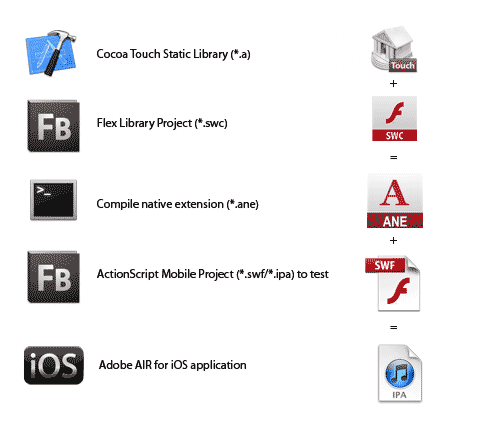
But let me quickly remind you the workflow. You need 3 projects, one is Flex Library project in FB (AS3 interface for C as *.swc), second is native library in Xcode (C interface and implementation as static library *.a), third is the actual test project in FB to run the native extension (*.ane).
Fig: Native Extension Creation Process
In this tutorial I want to illustrate how to transfer some basic types like Number, String, int/uint and Boolean from AS3 to C, process them and return back to AS3. In the next tutorial, we will look into more complex data types like Array, ByteArray and BitmapData.
*UPDATE: Casting Array and Vector from AS3 to C
Good starting point: Native C API Reference for Adobe AIR extensions. There is also a good page Coding native side with C for AIR.
But there is nothing better than samples. Let’s dig into some real code:
Number (AS3->C->AS3) Sum function
AS3 part:
public function sum(number1:Number,number2:Number):Number{
       // call C function sum with 2 arguments, number 1 and number2 and return a value
	var ret:Number = context.call("sum",number1,number2) as Number;
	return ret;
}
C part:
FREObject sum(FREContext ctx, void* funcData, uint32_t argc, FREObject argv[]){
    // argc ... argument count, uint
    // argv ... argument values, Array

    // retrieve first argument and write it to a variable
    double number1;
    FREGetObjectAsDouble(argv[0], &number1);

    // retrieve second argument and write it to a variable
    double number2;
    FREGetObjectAsDouble(argv[1], &number2);

    // add first and second number together
    double sum = number1 + number2;

    // write computed sum to FREObject that will be returned back to AS3
    FREObject sumToReturn = nil;
    FRENewObjectFromDouble(sum, &sumToReturn);

    return sumToReturn;
}
int (AS3->C->AS3) Subtract function
AS3 part:
public function subtract(int1:int,int2:int):int{
	var ret:Number = context.call("subtract",int1,int2) as int;
	return ret;
}
C part:
FREObject subtract(FREContext ctx, void* funcData, uint32_t argc, FREObject argv[]){
    int32_t int1;
    FREGetObjectAsInt32(argv[0], &int1);

    int32_t int2;
    FREGetObjectAsInt32(argv[1], &int2);

    int32_t sum = int1 - int2;

    NSLog(@"%d-%d=%d",int1,int2,sum);

    FREObject sumToReturn = nil;
    FRENewObjectFromInt32(sum, &sumToReturn);

    return sumToReturn;
}
uint (AS3->C->AS3) Multiply function
AS3 part:
public function multiply(uint1:uint,uint2:uint):uint{
	var ret:Number = context.call("multiply",uint1,uint2) as uint;
	return ret;
}
C part:
FREObject multiply(FREContext ctx, void* funcData, uint32_t argc, FREObject argv[]){
    uint32_t uint1;
    FREGetObjectAsUint32(argv[0], &uint1);

    uint32_t uint2;
    FREGetObjectAsUint32(argv[1], &uint2);

    uint32_t sum = uint1*uint2;

    NSLog(@"%d*%d=%d",uint1,uint2,sum);

    FREObject sumToReturn = nil;
    FRENewObjectFromUint32(sum, &sumToReturn);

    return sumToReturn;
}
String (AS3->C->AS3) Concatenate function
AS3 part:
public function concatenate(str1:String,str2:String):String{
	var ret:String = context.call("concatenate",str1,str2) as String;
	return ret;
}
C/Obj-C part:
// in this sample I wanted to go even further and utilize Obj-C function for concatenating strings and also demonstrate how to pass strings between C and Obj-C
FREObject concatenate(FREContext ctx, void* funcData, uint32_t argc, FREObject argv[]){
    // To be filled
    uint32_t string1Length;
    const uint8_t *string1;
    FREGetObjectAsUTF8(argv[0], &string1Length, &string1);

    uint32_t string2Length;
    const uint8_t *string2;
    FREGetObjectAsUTF8(argv[1], &string2Length, &string2);

    // Convert C strings to Obj-C strings
    NSString *string1ObjC = [NSString stringWithUTF8String:(char*)string1];
    NSString *string2ObjC = [NSString stringWithUTF8String:(char*)string2];

    // Concat strings
    NSString *returnString = [string1ObjC stringByAppendingString:string2ObjC];

    // Convert Obj-C string to C UTF8String
    const char *str = [returnString UTF8String];

    // Prepare for AS3
    FREObject retStr;
	FRENewObjectFromUTF8(strlen(str)+1, (const uint8_t*)str, &retStr);

    // Return data back to ActionScript
	return retStr;
}
Boolean (AS3->C->AS3) Opposite function
AS3 part:
public function opposite(bool:Boolean):Boolean{
	var ret:Boolean = context.call("opposite",bool) as Boolean;
	return ret;
}
C part:
FREObject opposite(FREContext ctx, void* funcData, uint32_t argc, FREObject argv[]){
    uint32_t boolean;
    FREGetObjectAsBool(argv[0], &boolean);

    uint32_t oppositeValue = !boolean;

    FREObject retBool = nil;
    FRENewObjectFromBool(oppositeValue, &retBool);

    return retBool;
}
Full C-part source code: IOSExtension.m
Download whole C-project for Xcode
Complete AS3 SWC lib part: IOSExtension.as
Test project source (SWF/IPA): IOSExtensionTest.as
For compiling native extension (*.ane) I use this command in Terminal.app.
compileExtension.sh file/script
unzip -o IOSExtension.swc

/PATH/TO/FLEX_AIR_SDK/bin/adt -package -target ane IOSExtension.ane extension.xml -swc IOSExtension.swc -platform iPhone-ARM library.swf libIOSExtension.a
extension.xml looks like this:
<extension xmlns="http://ns.adobe.com/air/extension/2.5">
    <id>com.krcha.IOSExtension</id>
    <versionNumber>1</versionNumber>
    <platforms>
      <platform name="iPhone-ARM">
        <applicationDeployment>
          <nativeLibrary>libIOSExtension.a</nativeLibrary>
          <initializer>ADBEExtInitializer</initializer>
          <finalizer>ADBEExtFinalizer</finalizer>
        </applicationDeployment>
      </platform>
    </platforms>
</extension>
List of Flash Gaming Engines
January 11th, 2010
Recently there has been a lot of buzz about creating Flash games, especially social ones. Flash makes you cash as proved by Zynga, Playfish, Playdom, WonderHill and others. Check their websites and portfolios to get a picture about Flash social gaming.

I’ve put together this list of libraries and engines to help you start building Flash games or to explore new possibilities.
We’ve also launched the Flash Platform Game Technology Center, which is definitely a great resource for every developer.
These are the libraries I personally consider highly useful for game development. Some of them are just for games - others are great complements. I am not going to write a lot about each of as they are mostly doing the same kinds of things, such as collision detection, physics, tilemaps, optimized rendering, levels, sounds/volume, game states, scores, and more. Some of them even offer multiplayer support. It’s better (and more fun) to try some demo games and see them in action.
Read the rest of this entry »
Is your Flex app big in KB? Use Runtime Shared Libraries
December 8th, 2008
Using RSLs is one of the most recommended methods for reducing file size and I highly encourage you to do this. Simply - more people use RSLs in their projects, better for everybody and I am going to tell you why.
When you compile you Flex app, the whole SDK and other SWC libraries are added to your SWF, that means if you write only one line of ActionScript code in Flex you compiled app will have definitely more than 100 KB in size and this is really not cool.
RSL technique separate libraries you use from your code and place them next to your app. Then when your app is loaded, it looks for dependency libraries (RSLs), load them and cache them - so this is the answer for why more people should use it, because it may simply happen - that user loading your Flex app already has the library and doesn’t have to load it again.
There are signed and unsigned libraries. Signed are those cached by a Flash Player, which is great, while it’s independent on browser cache and system. Unsigned are simply cached by browser, which is same cool, but it may happen that you empty your cache and lose all cached libraries. Adobe is responsible for signing libraries and it’s all Flex SDKs and later others.
To enable RSLs in Flex is very easy, just change your Flex Build Path Framework linkage from Merged into code to Runtime shared library:
Â
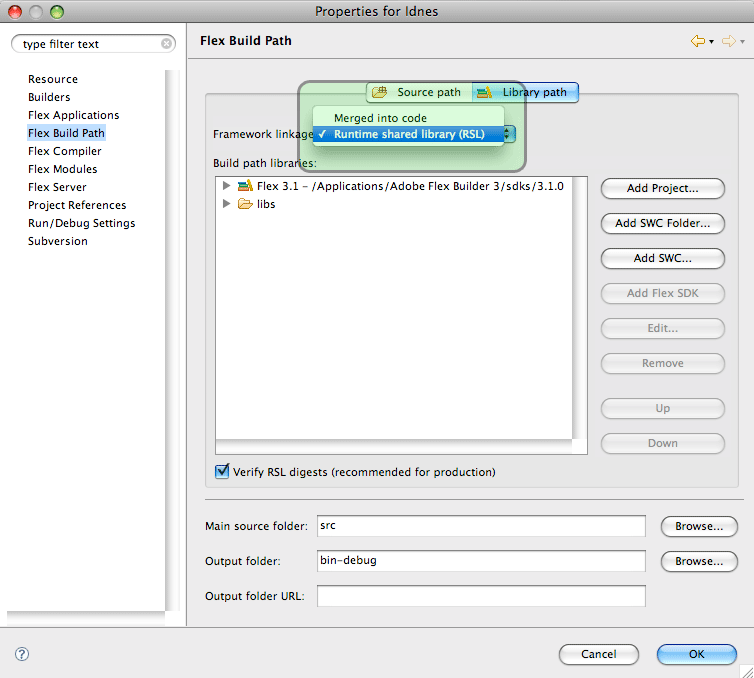
RSL setup in Flex
Â
Â
Serge Jespers has recorded great video: 3 Ways to Make Your Flex Applications Smaller:
1. use modules
2. use release output instead of debug
3. use RSLs
It’s 5 minute video… really recommend you to watch it!
Useful links:
- RSL at Adobe Labs
- Using Runtime Shared Libraries at Adobe Developer Center