Kooky for iPad by Amanita Design released
August 30th, 2012
 Kooky for iPad is out now and I had a great chance to work on the app with a friend. The app is composed of the book, movie, making of the movie, drawings/sketches and there is also a little game, where you have to find all the forest creatures hidden in the woods.
Amanita Design is well known for their games like Machinarium or Samorost, but Kooky is a movie. It’s been created by the director Jan Svěrák and illustrated by Jakub Dvorský from Amanita Design and you can feel his unique signature along the whole movie.
Kooky is a story of a puppet, who finds one day his way into the woods. He meets with other forest creatures and experience lot of stories.
Watch the trailer:
The app is currently promoted by Apple in the US App Store Entertainment section.

The app also features full retina display support and it’s written with Adobe PhoneGap and a bit of custom Obj-C. I will be covering all the technical details in the article later on.
Enjoy!
Adobe Scout aka “Monocle” - profiling tool for Flash/AIR
August 7th, 2012
Update: January 11th 2013
Adobe has released Adobe Scout, formerly known as project “Monocle”, the tool for advanced profiling of Flash/AIR apps. Check it out here.
———
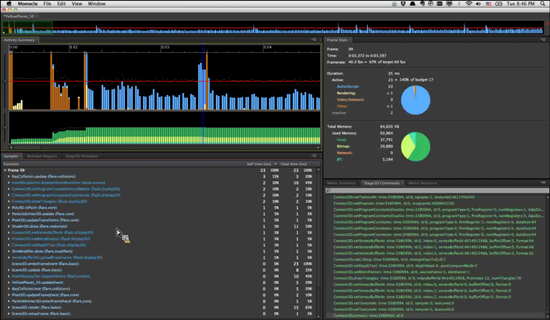
Adobe is working on the new CPU/GPU/Memory profiling for Flash and AIR projects, codename: “Monocle”. Monocle will enable you to find bottlenecks in your apps way faster than ever before and tune the performance of your apps to the top. Monocle will also enable you to profile mobile AIR apps on real devices (iOS and Android).
Watch the video:
Upcoming E-Seminars: Develop Flash based iOS Apps and Games with Adobe AIR 3.3
June 14th, 2012

Adobe will be running a series of online seminars on iOS development using Adobe AIR in June, July and August. Great chance to learn the best practices and ask questions.
Check it out, the time is always:
10:00 AM - 11:00 AM US/Pacific, San Francisco
1:00 PM - 2:00 PM New York
6:00 PM - 7:00 PM London, Lisbon
7:00 PM - 8:00 PM CET, Barcelona, Paris, Berlin, Prague, Vienna
8:00 PM - 9:00 PM Kiev, Bucarest, Athens, Tel-Aviv
9:00 PM - 10:00 PM Moscow, Dubai
AIR For iOS - Build Your First iOS App - “Hello World” Session ›
Thursday, June 21, 2012
AIR For iOS - Features, Capabilities, and Limitations ›
Thursday, June 28, 2012
AIR For iOS - Measuring performance – Instruments and Monocle ›
Thursday, July 12, 2012
Build Your First iOS Native Extension With Adobe AIR ›
Thursday, July 19, 2012
Debugging AIR Native Extension For iOS ›
Thursday, July 26, 2012
AIR 3.3 - New Graphics Features ›
Thursday, August 2, 2012
Using USB debugging with AIR 3.3 for iOS
June 9th, 2012

With AIR 3.3 there is a useful feature coming - USB debugging on iOS. (Note: This feature is already available with AIR for Android.) Previously you could debug over WiFi on iOS, but now USB debugging is available and it is way more comfortable to use.
This feature is not yet available in Flash Builder, but will be in the future. If you want to use it now, follow the steps below with the command line:
To debug an AIR for iOS app, you have to use three different commands: adt (compilation), idb (port forwarding) and fdb (debugger)
1) Compile the application
Compile with ipa-debug or ipa-debug-interpreter and include the -listen [port] switch (I am using the default port 7936)
compile.sh file
-target ipa-debug-interpreter -listen 7936
-provisioning-profile PROFILE.mobileprovision
-keystore CERTIFICATE.p12 -storetype PKCS12
-storepass PASSWORD FINALAPP.ipa DESCRIPTOR-app.xml APP.swf
2) Install the application on an iOS device
I am using command-line installation on Mac, but you can use iPhone Configuration Utility, iTunes or Xcode Organizer to install .IPA file on an iOS device. Find out more about IPA installation here.
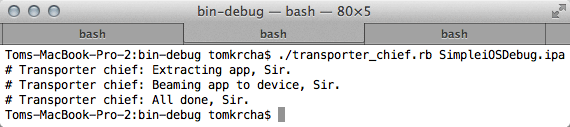
Run this at the command line; it will transfer an iOS app (IPA) to the device:
Your command-line should look like this:
3) Open the application on an iOS device
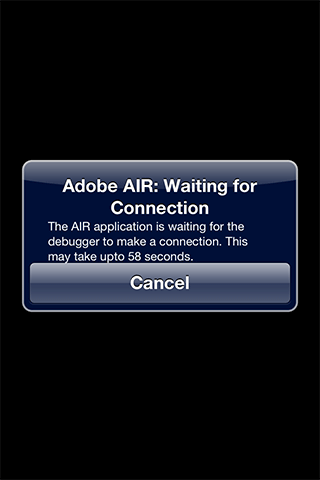
You should see this screen:
4) Launch the FDB debugger
The FDB command is part of Flex SDK, which is usually located here: “/Applications/Adobe Flash Builder 4.6/sdks/4.6.0/bin/fdb”
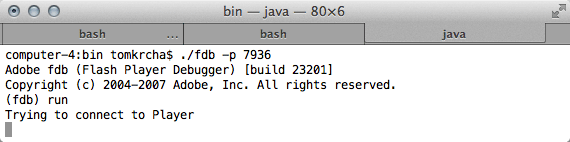
Execute the following command in command-line; the port we are going to use for this is 7936:
Once it opens, type run, hit enter and you should see this:
5) Forward ports with the IDB command
As a part of the AIR 3.3 SDK, you can find the idb command at AIR33SDK/lib/aot/idb/idb
It tells you what devices are connected and it allows you to forward ports and establish communication between the debugger and the device. Switch to the AIR33SDK/lib/aot/idb/ folder and run:
You should see something like this:
Handle UUID
14 2348920341abe904922030938292234
The number 14 is important in this case. Remember it and initiate port forwarding by launching:
6) Debug with the FDB debugger
Now go back to the Terminal screen where you have FDB running and type continue. You should see trace calls coming in to the terminal windows. Of course you can set breakpoints and so on, for more information see the FDB documentation.
In the debugger you should see this:
Adobe fdb (Flash Player Debugger) [build 23201]
Copyright (c) 2004-2007 Adobe, Inc. All rights reserved.
(fdb) run
Trying to connect to Player
Player connected; session starting.
Set breakpoints and then type ‘continue’ to resume the session.
[SWF] SimpleiOSDebug.swf - 1,393 bytes after decompression
(fdb) continue
[trace] APPLICATION INITIALIZED
[trace] HELLO DEBUGGER
[trace] HELLO DEBUGGER
[trace] HELLO DEBUGGER
The application I used was very simple, here is the code:
package
{
	import flash.display.Sprite;
	import flash.events.MouseEvent;

	[SWF(width="960",height="640")]
	public class SimpleiOSDebug extends Sprite
	{
		public function SimpleiOSDebug()
		{
			trace("APPLICATION INITIALIZED");
			stage.addEventListener(MouseEvent.CLICK, onClick);
		}

		protected function onClick(event:MouseEvent):void
		{
			trace("HELLO DEBUGGER");
		}
	}
}
Run your Flash apps in Xcode iOS Simulator with AIR 3.3
June 9th, 2012
AIR 3.3 adds a new feature to preview and debug your apps directly in iOS Simulator, which is part of Xcode on Mac. This speeds up testing and preview of an app or a game especially when you use native extensions.
[Download AIR 3.3 SDK]
[ADT command documentation]
Simulator support is not yet part of Flash Builder, but you can already use it via the command-line:
Compile for iOS Simulator
There are two new options available with adt for iOS Simulator compilation:
1) ipa-test-interpreter-simulator (for testing)
2) ipa-debug-interpreter-simulator (for debugging)
-target ipa-test-interpreter-simulator
-provisioning-profile DEMO.mobileprovision
-keystore CERTIFICATE.p12
-storetype PKCS12
-storepass PASSWORD FINALAPP.ipa DESCRIPTOR.xml APP.swf
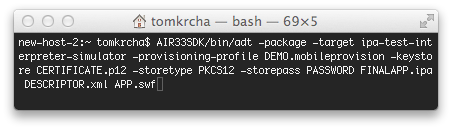
The command in Terminal.app on Mac:
Install to iOS Simulator
In order to install app to iOS Simulator use the -installApp switch. See usage below:
-platform ios
-platformsdk /Applications/Xcode.app/Contents/Developer/Platforms/iPhoneSimulator.platform/Developer/SDKs/iPhoneSimulator5.1.sdk
-device ios-simulator
-package FINALIPA.ipa
Launch app in iOS Simulator
To launch the app, there is the -launchApp switch used together with the -appid.
-platform ios
-platformsdk /Applications/Xcode.app/Contents/Developer/Platforms/iPhoneSimulator.platform/Developer/SDKs/iPhoneSimulator5.1.sdk
-device ios-simulator
-appid com.krcha.IDofMyApplication
Uninstall app from iOS Simulator
Use the -uninstallApp switch. See below:
-platform ios
-platformsdk /Applications/Xcode.app/Contents/Developer/Platforms/iPhoneSimulator.platform/Developer/SDKs/iPhoneSimulator5.1.sdk
-device ios-simulator
-package com.krcha.IDofMyApplication
In the real world, it’s good to put the commands above in separate .sh or .bat files. You can also combine them into a single command to run your app even faster; for example:
run.sh
1) compile.sh
2) uninstall.sh
3) install.sh
4) launch.sh
Important note: in order to make native extensions run properly in iOS Simulator, you have to compile them with iPhone-x86 settings, not iPhone-ARM.
In extension.xml change the platform name
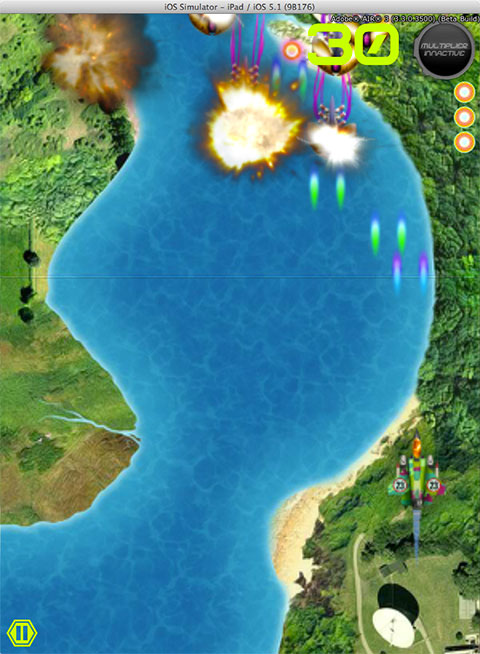
<platform name=”iPhone-x86″>Waste Invaders running in the iOS Simulator.
Tune your AIR for iOS development skills: compile, install and profile like a pro
May 31st, 2012
The purpose of this article is to share with you some tips that might help you to speed up and improve the process of building AIR for iOS apps. These are the practices that I use every day and hopefully some of you will find them useful.
Installing an app (*.IPA) on your iOS device
As a developer you want to save time, be able to install apps on your device quickly and see the results. Using iTunes for app install has some drawbacks: you will have to synchronize it and it takes lot of time and you cannot install apps on devices that are not synchronized with your iTunes (like a friend’s iPad).
There are three ways I find quicker + one useful when you have more testers involved:
iPhone Configuration Utility
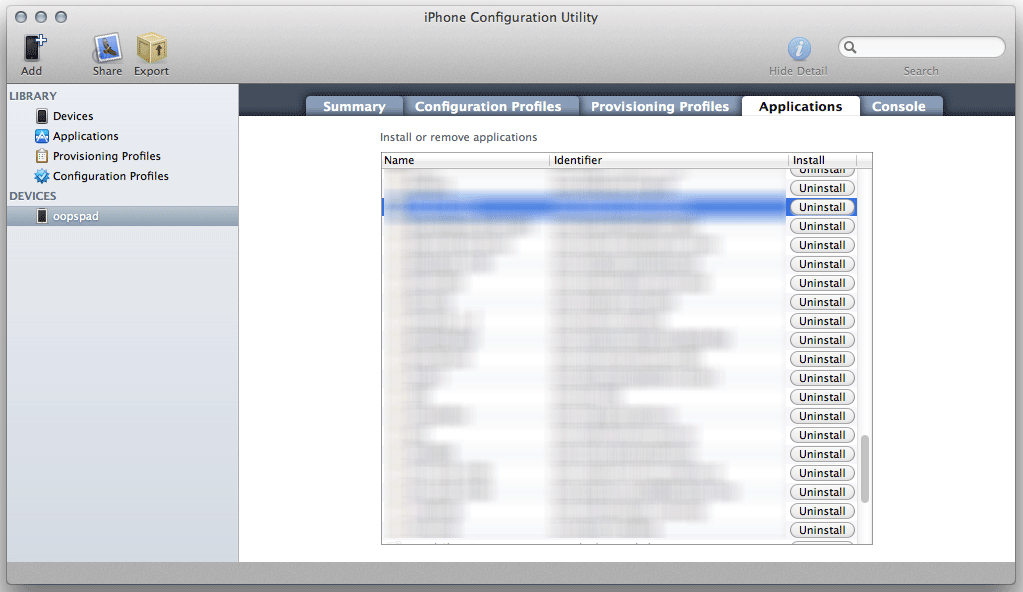
Available for Windows and Mac from Apple, this smart piece of software helps you to manage apps installed on your devices. Drag and drop an IPA file to Applications and then choose a device and install or uninstall specific apps. This works for iPad as well. You can also manage configuration and provisioning profiles.
Download for Windows | Download for Mac
Xcode Organizer
Once you run Xcode, go to Window -> Organizer. There you can see the list of devices you use. Pick the connected one and click the button labeled “Use for development”. Then you can just drag and drop IPA files on the device name on the left side and the app will install.
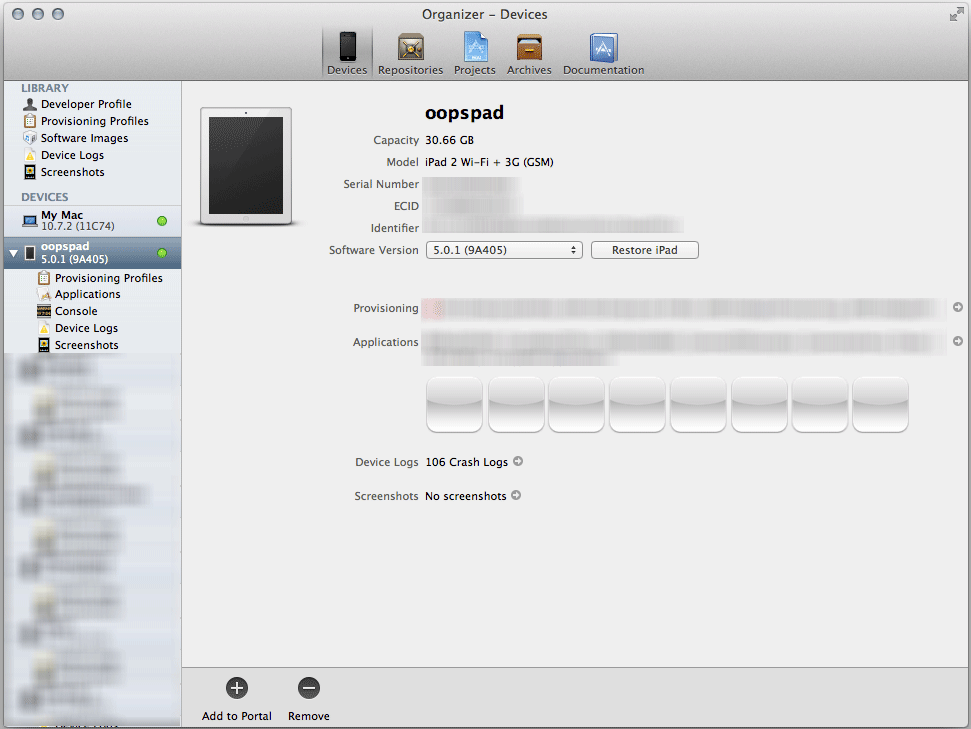
Command-line install to iOS device
The absolutely fastest method for copying your apps to a device is to use the command-line (Terminal.app on Mac, Command Prompt cmd on Windows). When used together with the command-line compilation, you can greatly automate the overall test deployment of your apps.
Have a look at this article (currently for MacOS only), it works:
How to deploy iOS apps to the iPhone via the command-line
Try combining the above with the compilation process below in a single deploycompile.sh command and you get ultimate and very fast solution for your development process.
TestFlightApp
You can also deploy IPA files to devices over internet. This method is however cumbersome for quick testing by a single developer as you have to always upload an IPA to the TestFlightApp website, but it’s great if you have several or many remote testers, so you don’t have to send the file to each one of them - TestFlightApp covers the testing distribution for you. Check https://testflightapp.com/
Compile with command-line
There are many way to compile your apps. You can go via Flash Builder, that’s probably the easiest way and I use it very often. There are four modes Fast (ipa-test interpreter), Standard (ipa-debug) and Release (ipa-app-store, ipa-ad-hoc).
But sometimes you want to automate things or just compile a SWF file without having the source code, that’s where command-line comes into play and it’s actually very easy to use.
On Mac you can use the Terminal.app on Windows the Command Prompt.
For packaging AIR apps there is ADT package command (see docs)
You can compile your app simply this way:
path/to/sdk/bin/adt -package -target ipa-app-store -provisioning-profile Profile.mobileprovision -storetype pkcs12 -keystore YOUR_IOS_CERTIFICATE.p12 -storepass YOUR_CERTIFICATE_PASSWORD FINAL_APP.ipa APP_DESCRIPTOR.xml TO_BE_COMPILED.swf ADDITIONAL_FOLDERS_OR_ASSETS
For instance if you have an AIR app named Tetris.swf with a descriptor Tetris.xml, just run this (assuming you are using the SDK from Flash Builder).
/Applications/Adobe\ Flash\ Builder\ 4.6/sdks/4.6.0/bin/adt -package -target ipa-app-store -provisioning-profile Profile.mobileprovision -storetype pkcs12 -keystore cerfiticate.p12 -storepass mypass Tetris.ipa Tetris.xml Tetris.swf
If you will have some assets for the tetris game that you want to load at runtime, just pass the folder name after the *.swf file.
/Applications/Adobe\ Flash\ Builder\ 4.6/sdks/4.6.0/bin/adt -package -target ipa-app-store -provisioning-profile Profile.mobileprovision -storetype pkcs12 -keystore cerfiticate.p12 -storepass mypass Tetris.ipa Tetris.xml Tetris.swf assets1 assets2
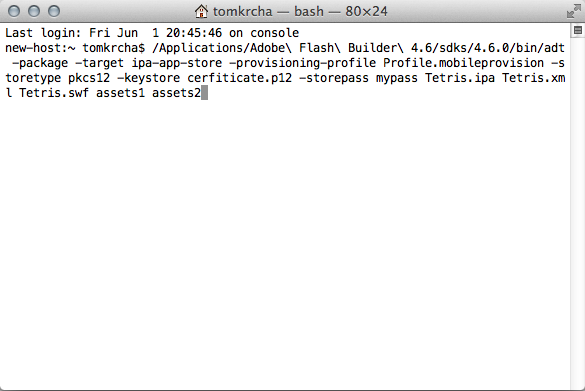
[Command in Terminal.app]
You can put the command above in files (*.sh, *.bat). So the above line you put for instance in run-able compile.sh file. You can have commands like compile.sh, install.sh, run.sh, uninstall.sh or even like compileUninstallInstallRun.sh, which makes things even faster and single command does all the job. You can also automate certain things, change version in txt/xml file that you load into your app and so on, these scripts can be also deployed on a server and build automated daily builds from SVN, so many things to play with here.
Profile your app
Profiling is very useful as it allows you to find memory leaks, lower your memory usage and improve the performance for your app. You should do this periodically, not just when you are done with the app.
There are three useful tools for that.
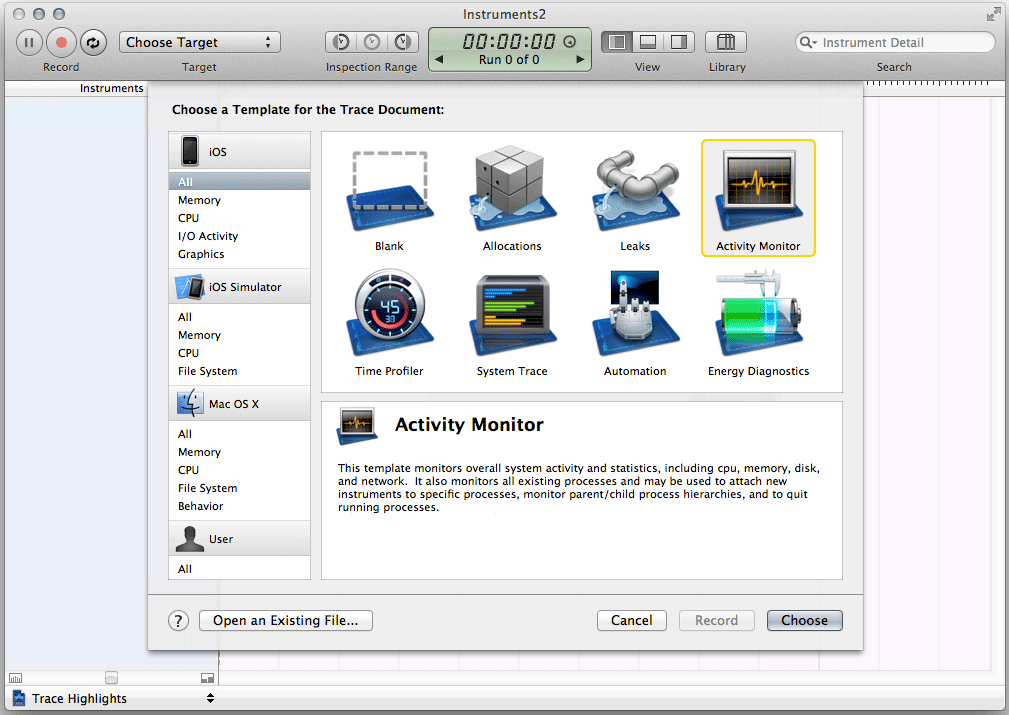
Apple Instruments
Instruments are part of Xcode development tool from Apple. You can launch it from menu Xcode -> Open Developer Tool -> Instruments. With instruments you can see real FPS, real memory usage, real CPU usage the on device reported by iOS and much more.
Flash Builder Profiler
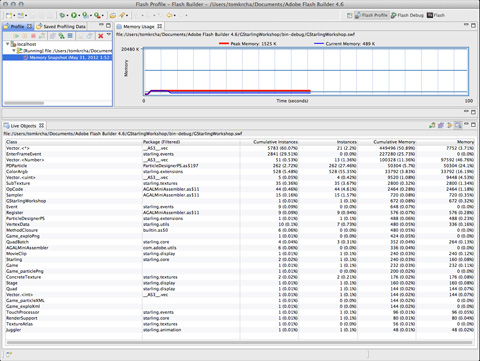
Run your app in profiler (via menu Run->Profile or Profile button) from Flash Builder. You will be able to see what objects are allocated in the memory, how many instances you have and memory leaks (if something grows and it shouldn’t). In side-scroller games you should avoid creating instances during the game play and removing them as the garbage collector will try picking them up, otherwise you might get a choppy experience. For that you have to implement pools and recycle instances.
You can also find loitering objects by comparing two memory snapshots. This will help you to find the objects you forgot to release from the memory.
Tip: Force garbage collection
Sometimes you need to clean-up memory immediately and not wait for GC to collect it automatically, especially when profiling.
With AIR you can actually force GC with the following call:
flash.system.System.gc();
Tip: Postpone garbage collection
This is very useful trick if you want to delay GC. Every garbage collection could lock your UI and glitch overall game experience for a second (or less). You may need to avoid this especially in the kind of games where you need smooth game play.
Check out the following:
flash.system.System.pauseForGCIfCollectionImminent(imminence);
Monocle profiler
Codename: Monocle is an upcoming profiler by Adobe, which basically allows you to find bottlenecks in your app frame-by-frame and help you resolve performance problems in your apps. Find out what is consuming the most processing time in your app, watch Stage3D rendering step by step and much more. You will hear more about it soon.
iOS Simulator
As of AIR 3.3, you can now run your applications in iOS Simulator on MacOS X. iOS Simulator is part of Xcode. It allows you to test your IPA files directly on your Mac. This is very useful for testing native extensions (just don’t forget to compile them for iPhone-x86, not iPhone-ARM).
Check out the new targets ipa-test-interpreter-simulator and ipa-debug-interpreter-simulator, together with -installApp, -launchApp, -uinstallApp switches in the adt command, which is located in AIR 3.3 SDK bin folder.

GPUImage: GPU-based image processing for Flash Stage3D
May 21st, 2012
Eugene Zatepyakin just made his library GPUImage available at github. Definitely check it out.
How does it work: you have a bitmap, send it to GPUImage, apply filters, it will process it on GPU and render on GPU, all via Stage3D + AGAL shaders.
Download the package, and run gpuimage_showcase.swf in the bin folder, it’s a showcase of GPUImage filters, you can also combine them. Switch between the filters with mouse double click.

Sneak peek: RAVE AI - artificial intelligence for Flash/AS3
May 10th, 2012
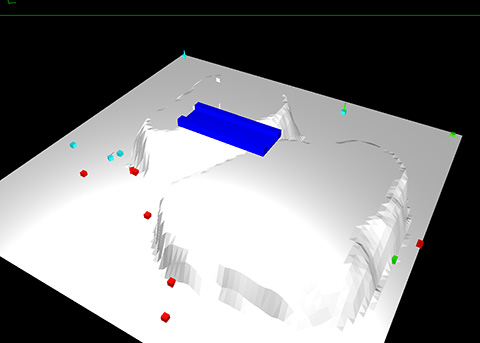
RAVE AI is an upcoming artificial intelligence framework for Flash/AS3 by Tomas Vymazal from Brno, Czech Republic. The main purpose of this framework are 2D/3D first person shooter games and other sort of games that require agent simulation. It supports JSON finite state machine definition, so you can predefine the behavior of agents. Next to that it supports 2D/3D terrain, bridges, very optimized pathfinding, sight/raycasting/shooting and there is a very impressive yet internal roadmap as well.
You can look forward to it later this year, the performance is amazing and Tomas is also planning to add support for ActionScript Workers for background processing later when available.
See it in action / rendering via Minko engine:
Get in touch with Tomas at twitter @myownclone.
Stay tuned for more.