MAX Racer Remote Device Controller in AIR for Android
November 25th, 2010
Quick heads-up my friends. When we first demoed MAX Racer, we have previewed initial support for USB Steering Wheel, etc. This support is a sneak peek feature in Flash Player, not available right now.
This really needs you have one of these devices at home. So we were thinking about more lightweight way of controlling the game and device or mobile phone is ideal for this.
I’ve built a little app in Flex Mobile “Hero” for AIR for Android, that controls the game by sending accelerometer, speed info, brake and so on using local P2P connection over WIFI.
Check the video how it works:
Read the rest of this entry »
Winners of the Summer AIR Mobile Contest (CZ/SK)
October 21st, 2010
I am proud to announce winners of the Czech/Slovak Summer AIR Mobile Contest 2010 and I have to say, I was amazed by the talent and passion guys put into development.
Prizes were 2x Google Nexus One, 1x CS5 Web Premium, 2x Flash Pro CS5, 3x Flash Builder 4 and some goodies.
1st place
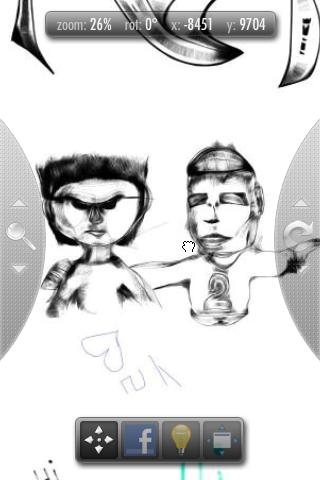
onBoard - endless realtime drawing board with P2P support
Versions: AIR for Android, AIR for desktop, Flash Player in browser
Author: Jozef ChĂştka
My comment: onBoard brings completely new look on social creativity. You start drawing something and someone finishes it and adds new ideas to that. The app is in it’s beginnings and it’s used by 500 people a day currently. It’s also very optimized to run fluently on mobile devices. It uses mipmapping - depth of zoom like Google Maps.
Available in Android Market
Tip: Close Your Android AIR App on Back Button
October 13th, 2010
While developing AIR for Android apps, you should consider whether you need your apps to run in the background, especially if they are highly intensive graphic games.
To make your users even happier, it’s a good idea to close your app when the Back or Home button is pressed to free CPU and memory. Multitasking is a great thing, but if your app doesn’t need to be open, it’s better to close it and maybe save the state of your application. You can read this article on saving state in AIR applications for iOS devices (same should work for Android).
My fellow evangelist Mark Doherty sent me this code, which does the job. It can be helpful to you, so sharing:
Register handlers:
if(Capabilities.cpuArchitecture=="ARM")
{
	NativeApplication.nativeApplication.addEventListener(Event.ACTIVATE, handleActivate, false, 0, true);
	NativeApplication.nativeApplication.addEventListener(Event.DEACTIVATE, handleDeactivate, false, 0, true);
	NativeApplication.nativeApplication.addEventListener(KeyboardEvent.KEY_DOWN, handleKeys, false, 0, true);
}
Define handlers:
private function handleActivate(event:Event):void
{
	NativeApplication.nativeApplication.systemIdleMode = SystemIdleMode.KEEP_AWAKE;
}

private function handleDeactivate(event:Event):void
{
	NativeApplication.nativeApplication.exit();
}

private function handleKeys(event:KeyboardEvent):void
{
	if(event.keyCode == Keyboard.BACK)
	NativeApplication.nativeApplication.exit();
}
Good luck!
UDP in Adobe AIR 2.0
September 1st, 2010
My fellow evangelist Michael Chaize put together a video on a related topic - UDP. See this presentation on how to start with UDP (User Datagram Protocol) in Adobe AIR 2.0.
Discover the UDP API in Adobe AIR 2.0
Check also his second tutorial - UDP Video in AIR 2.0.
Enjoy!
Summer AIR Mobile Contest 2010 CZ/SK
July 6th, 2010
Adobe Czech Republic in cooperation with the youth conference JuniorInternet (by Together CZ) is opening an innovative contest for Czech and Slovak developers to celebrate mobile versions of Flash Player 10.1 and AIR for Android. Enter and win a Google Nexus One or Creative Suite 5!