P2P GroupSpecifier Class Explained In Details Part 1
March 11th, 2010
If you’ve tried my tutorial on creating a simple chat using P2P NetGroup in Flash Player 10.1, you might have been wondering what the other parameters you can set up mean.
GroupSpecifier is a very powerful class and ASDocs are good resource to look in, but I thought I’d write few more words on this topic since it’s easier to understand with a little more explanation.
postingEnabled and multicastEnabled
These are self-explanatory. Just a little note: the difference between Multicast and Posting is simply in the overhead used during their management. Posting should be used when you have lots of senders sending relatively little data (like Chat). Multicast when you have fewer senders sending lots of data (Video, Chat).
peerToPeerDisabled
Why should I disable P2P when I am building a P2P application? Obvious question. This one is for IP Multicast.
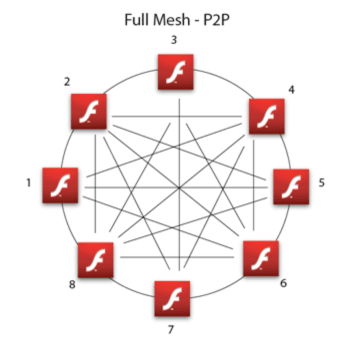
Application-Level-Multicast (so called P2P Multicast) is multicast established over peers.
Native IP Multicast is multicast enabled in the network - it must be supported by routers and the network itself.
Fusion is Application-Level-Multicast and Native IP Multicast used together.
So, when you disable P2P by saying peerToPeerDisabled=true, your app will use only Native IP Multicast, which is more efficient, but works mostly only in closed networks (like a company network).
serverChannelEnabled
Opens supporting functions from the server. In the basic scenario it enables auto-bootstrapping. Bootstrapping in this context means adding peers to the group. You can do this manually by calling the addBootstrapPeer function or setting serverChannelEnabled=true to make it automatic. In the P2P Chat example it basically takes care of adding peers to a group and establishes communication between them.
groupspecWithAuthorizations and groupspecWithoutAuthorizations
Difference? Security. If you set a posting or multicast password, the one “with” can post or multicast, the one “without” is receive-only.
Remember - GroupSpecifier is technically a String combined of properties and the name. If you change a property you will be in a different group.
More to come soon.
Simple chat with P2P NetGroup in FP 10.1
February 9th, 2010
This tutorial explains total basics of using P2P/RTMFP Groups in Flash Player 10.1. We are going to build simple multi-user chat using RTMFP Posting - all data will be transferred over P2P! For this purpose we use recently updated (22 Jan 2010) Adobe Stratus - rendezvous service.
Updated: 4:37 PM Feb 9 2010
Final demo: Try (run in few browsers) | Download source
Prerequsities:
- Flash Player 10.1
- UDP enabled network (you can’t be behind firewall, which blocks UDP)
- Flash Builder 4
- Stratus developer key - Get one here if don’t have already. You have to login using your Adobe credentials to get it.
- playerglobal.swc for Flash Player 10.1
Step 1: Create new Flex 4 project
File -> New -> Flex Project
Link new playerglobal.swc (FP10.1 API) to your project in Project Properties and set compiler version in Flex Compiler to 10.1.0

Step 2: Connect to Stratus
First of all we need to setup NetConnection to Adobe Stratus. That’s easy part.
private const SERVER:String = "rtmfp://stratus.adobe.com/"; private const DEVKEY:String = "YOUR-STRATUS-DEVELOPER-KEY"; private var nc:NetConnection; private function connect():void{ nc = new NetConnection(); nc.addEventListener(NetStatusEvent.NET_STATUS,netStatus); nc.connect(SERVER+DEVKEY); }
Step 3: Setup NetGroup
We need to setup P2P group and connect to it. GroupSpecifier is a class, which let’s you to define all the parameters of the group. First you give it a name - in this case “myGroup/g1″. Then you set it to use serverChannel, to let it communicate with Stratus. Finally we enable Posting. That’s all you have to do to define the P2P Group.
Then we have to define the actual NetGroup. groupspecWithAuthorizations() returns String - it’s a group identifier. Now you probably ask, what’s the difference between groupspecWithoutAuthorizations() and groupspecWithAuthorizations(). If you set a posting or multicast password, the one “with” can post or multicast, the one “without” is receive-only.
private function setupGroup():void{ var groupspec:GroupSpecifier = new GroupSpecifier("myGroup/g1"); groupspec.serverChannelEnabled = true; groupspec.postingEnabled = true; netGroup = new NetGroup(nc,groupspec.groupspecWithAuthorizations()); netGroup.addEventListener(NetStatusEvent.NET_STATUS,netStatus); user = "user"+Math.round(Math.random()*10000); }
Step 4: Handle NetStatusEvent
We are going to handle at this step just three events. When we connect to Stratus we setup a group. When we connect to NetGroup we reflect it to UI and and when we receive a Posting message we show it in chat history.
private function netStatus(event:NetStatusEvent):void{ trace(event.info.code); switch(event.info.code){ case "NetConnection.Connect.Success": setupGroup(); break; case "NetGroup.Connect.Success": connected = true; break; case "NetGroup.Posting.Notify": receiveMessage(event.info.message); break; } }
Step 5: Sending and receiving message
We have to put together a message object, which handles text, user name, sender ID. Sender ID is useful to have for direct posting. And we also convert NetConnection PeerID to GroupAddress - participant address in the group. When we post() message to a NetGroup, we just distribute it/broadcast it, but it does not come back to us. So that’s why we need to call receiveMessage as well - to display it in history text field.
private function sendMessage():void{ var message:Object = new Object(); message.sender = netGroup.convertPeerIDToGroupAddress(nc.nearID); message.user = txtUser.text; message.text = txtMessage.text; netGroup.post(message); receiveMessage(message); txtMessage.text = ""; } private function receiveMessage(message:Object):void{ write(message.user+": "+message.text); } private function write(txt:String):void{ txtHistory.text += txt+"\n"; }
Step 6: Create UI
<s:TextArea left="10" right="10" top="10" bottom="40" id="txtHistory"/> <s:TextInput x="10" id="txtUser" text="{user}" bottom="10"/> <s:TextInput left="145" right="88" id="txtMessage" bottom="10" enter="sendMessage()"/> <s:Button label="Send" click="sendMessage()" enabled="{connected}" bottom="10" right="10"/>
Step 7: Run it
Basics of P2P in Flash
May 31st, 2009
This videotutorial explains the basics of working with P2P (peer to peer) in Flash Player 10.
I made this tutorial with focus on simplicity of this fantastic feature of Flash. There are bunch of articles and examples in the world showing how to create your own P2P app, but most of them are very complex or hard to catch.
In this tutorial you’ll get idea how to connect two different peers and exchange data between them with ActionScript 3.0 and Flex only.
Prerequsites:
- familiarity with ActionScript 3 and Flex Framework
- Flash Player 10 Debug version installed download
- Flex Framework 3.3+ download
Videotutorial: http://flashrealtime.com/tuts/p2p-in-flash.html (20 min.)
Try: P2P demo (run in two browsers, explained in video)
Source: download P2P.mxml.zip
Note: Programatically the main P2P logic is not to connect peers together just via NetConnection, but by defining peerIDs to NetStream.
PS: don’t forget to change your Flex Compiler settings to use Flash Player 10
Btw: nice P2P Mill Game done by my friend Pavel Šimek http://nestor.cz/mill/
Good Luck!